
1. Εισαγωγή
This manual provides detailed instructions for the TRIGKEY Green G4 Mini PC, featuring the Intel Alder Lake-N100 processor. It covers initial setup, operation, maintenance, and troubleshooting to ensure optimal performance and user experience. Please read this manual thoroughly before using your device.
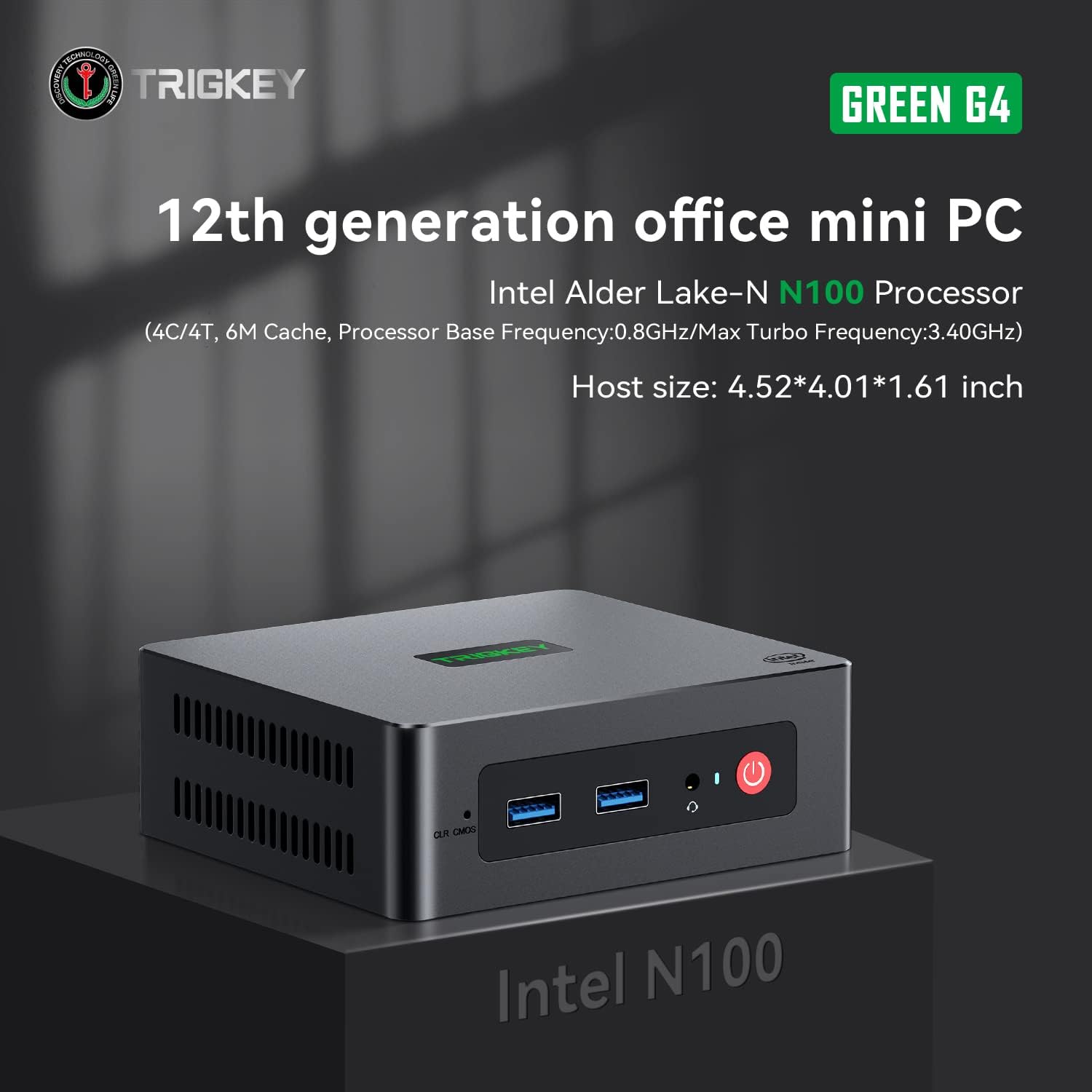
Image: TRIGKEY Green G4 Mini PC, highlighting its compact design and front panel.
2. Το προϊόν τελείωσεview
2.1 Βασικά χαρακτηριστικά
- Επεξεργαστής: Intel Alder Lake-N100 (4 Cores/4 Threads, up to 3.4GHz)
- Μνήμη: 16 GB DDR4 RAM (επεκτάσιμη)
- Αποθήκευση: 500GB NVMe SSD (expandable up to 2TB)
- Γραφικά: Intel UHD Graphics (24EUs)
- Συνδεσιμότητα: WiFi 6, Bluetooth 5.2, 1000MB/s LAN
- Έξοδος εμφάνισης: Dual 4K HDMI (60Hz)
- Συμπαγής σχεδιασμός: Host size approximately 4.52 x 4.01 x 1.61 inches
2.2 Θύρες και Διεπαφές

Image: Front and rear interfaces of the Mini PC.
| Θύρα/Διασύνδεση | Περιγραφή |
|---|---|
| Κουμπί λειτουργίας | Ενεργοποιεί/απενεργοποιεί τη συσκευή. |
| Ένδειξη ισχύος | Υποδεικνύει την κατάσταση ισχύος. |
| RTC Key (CLR CMOS) | Χρησιμοποιείται για την εκκαθάριση των ρυθμίσεων CMOS. |
| USB 3.2 Gen2 (10Gbps) | High-speed data transfer ports. |
| Υποδοχή ακουστικών | Audio output for headphones. |
| LAN (1000M) | Θύρα Gigabit Ethernet για ενσύρματη σύνδεση δικτύου. |
| 4K 60Hz HDMI | Dual HDMI ports for high-definition video output. |
| DC Power Adapter Port | Συνδέεται στο τροφοδοτικό. |
| Υποδοχή κλειδώματος | For security lock. |
3. Ρύθμιση
3.1 Αρχική σύνδεση
- Connect your monitor(s) to the HDMI ports on the rear of the Mini PC.
- Συνδέστε το πληκτρολόγιο και το ποντίκι σας στις διαθέσιμες θύρες USB.
- For wired internet, connect an Ethernet cable to the LAN port. For wireless, ensure the WiFi antenna is connected (if external) or that the internal WiFi is enabled.
- Connect the power adapter to the DC power port and then plug it into a power outlet.
- Πατήστε το κουμπί λειτουργίας στο μπροστινό μέρος του Mini PC για να τον ενεργοποιήσετε.
3.2 Πρώτη εκκίνηση
Upon first boot, the system may guide you through the initial setup of the operating system (e.g., Windows 11). Follow the on-screen prompts to configure language, region, network, and user accounts.
4. Οδηγίες λειτουργίας
4.1 Βασική λειτουργία
- Ενεργοποίηση/Απενεργοποίηση: Press the power button once to turn on. To shut down, use the operating system's shutdown option. A short press on the power button can also put the PC to sleep. A long press (5-7 seconds) will force a shutdown.
- Επανεκκίνηση: Use the operating system's restart option.
- Σύνδεση περιφερειακών: Use the available USB ports for external devices like printers, external drives, or webκάμερες.
- Συνδεσιμότητα δικτύου: Connect to a wired network via the LAN port or a wireless network using the built-in WiFi 6.
- Διπλή οθόνη: Connect two monitors to the HDMI ports for an extended or duplicated desktop experience.

Image: Mini PC supporting dual screen display for enhanced productivity.
4.2 Video Playback and Productivity
The Mini PC supports 4K high-definition output, suitable for media consumption and office tasks. Its compact size and efficient performance make it suitable for various applications, from home theater setups to general office work.
Video: TRIGKEY Mini PC G4 N100 product overview, επίδειξηasing its features and compact design.
5. Συντήρηση και Αναβαθμίσεις
5.1 Storage Expansion (2.5-inch HDD/SSD)
The TRIGKEY Green G4 Mini PC allows for additional storage expansion by installing a 2.5-inch HDD or SSD. Follow these steps carefully:
- Απενεργοποιώ: Ensure the Mini PC is completely powered off and disconnected from the power supply.
- Unscrew Bottom Panel: Locate and unscrew the screws on the bottom panel of the Mini PC.
- Open Back Panel: Carefully open the back panel to reveal the internal components and the storage bay.
- Insert SSD/HDD: Align the 2.5-inch SSD or HDD with the slot in the back panel and gently insert it.
- Ασφαλής μονάδα δίσκου: Use the provided screws to secure the SSD/HDD to the back panel.
- Reinstall Bottom Panel: Close the back panel and reinstall the bottom screws to secure it.

Image: M.2 PCIe SSD, demonstrating the internal storage component.
Video: Hard disk installation tutorial, demonstrating the steps to install an additional 2.5-inch HDD/SSD.
5.2 Αναβάθμιση μνήμης RAM
The Mini PC supports single-channel DDR4 memory. While it comes with 16GB, it can be upgraded depending on the memory type. Consult the product specifications for maximum supported RAM capacity and type before attempting an upgrade.

Image: SO-DIMM DDR4 memory module.
6. Αντιμετώπιση Προβλημάτων
6.1 Χωρίς ισχύ
- Βεβαιωθείτε ότι ο προσαρμογέας ρεύματος είναι συνδεδεμένος με ασφάλεια τόσο στον Mini PC όσο και σε μια πρίζα που λειτουργεί.
- Βεβαιωθείτε ότι η πρίζα λειτουργεί συνδέοντας μια άλλη συσκευή.
- Ελέγξτε τον προσαρμογέα ρεύματος για τυχόν ορατές ζημιές.
6.2 Χωρίς οθόνη
- Confirm that the HDMI cable(s) are securely connected to both the Mini PC and the monitor(s).
- Βεβαιωθείτε ότι η οθόνη είναι ενεργοποιημένη και ρυθμισμένη στη σωστή πηγή εισόδου (HDMI 1, HDMI 2, κ.λπ.).
- Try connecting to a different monitor or using a different HDMI cable to rule out external issues.
6.3 Operating System Installation Issues
If you encounter difficulties installing or reinstalling an operating system, especially when using custom installation media, note that some Mini PCs may require specific tools or methods for USB boot media creation. Refer to the manufacturer's support resources for guidance on creating compatible installation media.
6.4 Θόρυβος ανεμιστήρα
The Mini PC features active cooling. While designed to be quiet, a slight fan whine may be noticeable under heavy load or in very quiet environments. This is generally normal operation. Ensure the vents are not obstructed to allow for proper airflow.
7. Προδιαγραφές
| Χαρακτηριστικό | Λεπτομέρεια |
|---|---|
| Μάρκα | TRIGKEY |
| Αριθμός μοντέλου | N100 |
| Μοντέλο CPU | Intel Alder Lake-N100 (Celeron) |
| Ταχύτητα CPU | Έως 3.4 GHz |
| Πλήθος επεξεργαστή | 4 |
| Μέγεθος προσωρινής μνήμης | 6 MB |
| Εγκατεστημένο μέγεθος μνήμης RAM | 16 GB |
| Τύπος RAM | DDR4 SDRAM |
| Ταχύτητα μνήμης | 3200 MHz |
| Διαθέσιμες υποδοχές μνήμης | 1 |
| Περιγραφή σκληρού δίσκου | 500 GB NVMe SSD |
| Διεπαφή σκληρού δίσκου | NVMe |
| Συνεπεξεργαστής γραφικών | Γραφικά Intel UHD |
| Διεπαφή εξόδου βίντεο | HDMI (2 ports) |
| Μέγιστη ανάλυση οθόνης | 3840 x 2160 pixel (4K) |
| Ασύρματη τεχνολογία | Wi-Fi 6 (802.11ax), Bluetooth 5.2 |
| Τεχνολογία Συνδεσιμότητας | Ethernet (1000M) |
| Σύνολο θυρών USB | 6 (USB 3.2 Gen2) |
| Κατανάλωση ρεύματος | 6 Watt (τυπικό) |
| Χρώμα | Πράσινος |
8. Εγγύηση και υποστήριξη
TRIGKEY is committed to providing excellent customer service and support for your Mini PC.
8.1 Πληροφορίες εγγύησης
- Πολιτική επιστροφής: 30 ημέρες χωρίς λόγο επιστροφής.
- Αντικατάσταση: Δυνατότητα αντικατάστασης εντός 12 μηνών από την αγορά.
- Τεχνική Υποστήριξη: Εξυπηρέτηση μετά την πώληση και τεχνική υποστήριξη εφ' όρου ζωής.
8.2 Επικοινωνία με την Υποστήριξη
For any inquiries, technical assistance, or warranty claims, please contact TRIGKEY customer support. Response is typically provided within 24 hours.
- Υποστήριξη ηλεκτρονικού ταχυδρομείου: Refer to your product packaging or the official TRIGKEY webιστότοπος για email επικοινωνίας.
- Ηλεκτρονική Συμβουλευτική: Visit the TRIGKEY official website for online chat or support forms.
- Website Resources: Explore the TRIGKEY website for FAQs, drivers, and additional product information.