1. Εισαγωγή
This manual provides detailed instructions for the installation, setup, operation, and maintenance of the FX Luminaire LUX-300-SS Luxor Series ZDC Transformer Controller. This device is designed to manage low-voltage landscape lighting systems, offering advanced control features including zone management, color adjustment, and astronomical timing.
2. Πληροφορίες Ασφάλειας
Please read all safety instructions carefully before installing or operating the transformer. Failure to follow these instructions may result in electric shock, fire, or other hazards.
- Always disconnect power at the circuit breaker before installing or servicing the transformer.
- Η εγκατάσταση πρέπει να εκτελείται από εξειδικευμένο ηλεκτρολόγο σύμφωνα με όλους τους τοπικούς και εθνικούς ηλεκτρικούς κώδικες.
- Do not operate the transformer with damaged wiring or if the casinΤο g είναι σε κίνδυνο.
- Ensure the transformer is mounted securely to a stable surface.
- This unit is designed for outdoor use and is rated for its intended environment.
3. Περιεχόμενα συσκευασίας
Βεβαιωθείτε ότι όλα τα εξαρτήματα υπάρχουν στη συσκευασία:
- FX Luminaire LUX-300-SS Luxor Series ZDC Transformer Controller
4. Το προϊόν τελείωσεview
The LUX-300-SS is a 300-watt ZDC transformer controller housed in a durable stainless steel metal case. It provides comprehensive control over landscape lighting, integrating smart features for enhanced functionality.
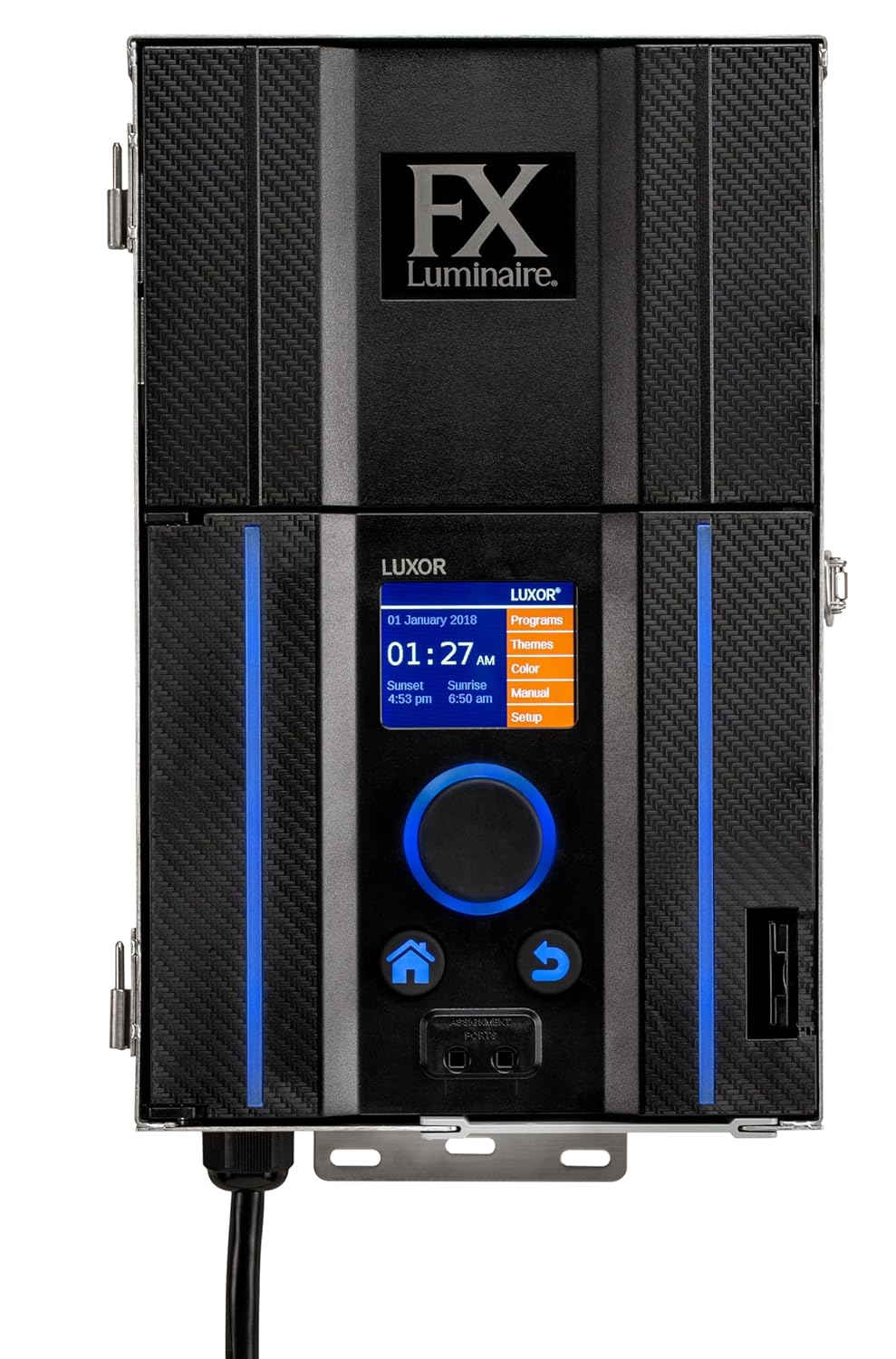
Εικόνα 1: Εμπρός view of the FX Luminaire LUX-300-SS Transformer Controller, showing the control panel and display.
Βασικά Χαρακτηριστικά:
- 300 Watt power rating with 120V primary voltage και συχνότητα 60Hz.
- Internet connectivity via LAN port or optional Wi-Fi Module (P/N - WIFIMOD2).
- Wireless control via optional iOS and Android app.
- Dimming control from 0-100%.
- Astronomical timing for automatic dusk and dawn adjustments based on location.
- Event-based scheduling and calendar-based programming.
- Up to 250 individual lighting zones.
- Color control with up to 30,000 colors per zone.
- Scene/Theme creation with up to 40 custom lighting themes.
- UL-1838, UL-379 compliant.
5. Εγκατάσταση
5.1 Τοποθέτηση
The LUX-300-SS is designed for wall mounting. Select a suitable location that is easily accessible, protected from direct impact, and allows for proper ventilation. Ensure the mounting surface is capable of supporting the unit's weight (approximately 23 pounds).
- Mark the desired mounting points on the wall using the transformer's mounting holes as a template.
- Drill pilot holes appropriate for your mounting hardware (not included).
- Securely fasten the transformer to the wall.

Image 2: The FX Luminaire LUX-300-SS Transformer Controller, illustrating its compact design suitable for wall mounting.
5.2 Ηλεκτρικές συνδέσεις
All electrical wiring must comply with local and national electrical codes. Ensure power is disconnected before making any connections.
- Connect the 120V AC input power to the designated terminals inside the transformer.
- Συνδέστε το low-voltage output wires from your landscape lighting fixtures to the appropriate output terminals on the transformer. Refer to the wiring diagram inside the unit for specific terminal assignments.
- Βεβαιωθείτε ότι όλες οι συνδέσεις είναι σφιχτές και ασφαλείς.
- Close and secure the transformer casing.
6. Ρύθμιση και διαμόρφωση
6.1 Αρχική ενεργοποίηση
Once installation is complete, restore power to the transformer at the circuit breaker. The unit's display will illuminate, guiding you through the initial setup process, which typically includes setting the date, time, and location.
6.2 Σύνδεση δικτύου
The transformer can be connected to the internet for remote control and updates:
- Θύρα LAN: Connect an Ethernet cable from your network router to the LAN port on the transformer.
- Optional Wi-Fi Module: If using the optional Wi-Fi Module (P/N - WIFIMOD2), install it according to its instructions. For areas with limited Wi-Fi strength, consider the Luxor Wi-Fi Module Remote Mount (P/N - WIFIMOD2RMT). Follow the on-screen prompts to connect to your Wi-Fi network.
6.3 App Control (iOS/Android)
Download the official FX Luminaire control app from the Apple App Store or Google Play Store. Follow the in-app instructions to pair your smart device with the transformer, enabling wireless control.
6.4 Zone and Color Control
The Luxor system allows for the creation of up to 250 independent lighting zones. Within each zone, you can adjust colors (up to 30,000 options) and dimming levels (0-100%). Use the transformer's interface or the mobile app to assign fixtures to zones and customize their settings.
6.5 Προγραμματισμός
The transformer offers flexible scheduling options:
- Astronomical Timing: Automatically adjusts dusk and dawn times based on your geographical location and seasonal changes.
- Event-Based Scheduling: Program specific lighting events to occur at certain times or in response to triggers.
- Calendar-Based Programming: Create schedules for specific dates or recurring patterns throughout the year.
7. Λειτουργία
7.1 Βασική λειτουργία
Navigate the transformer's menu using the control buttons on the front panel or through the mobile application. The main display provides current status, time, and sunrise/sunset information.
7.2 Έλεγχος ρύθμισης φωτεινότητας
Adjust the intensity of your lighting fixtures from 0% to 100% using the dimming controls available on the unit or via the app. This allows for customized ambiance and energy saving.
7.3 Scene/Theme Creation
Create and save up to 40 custom lighting themes or scenes. A scene can combine specific zone settings, colors, and dimming levels to be activated with a single command, suitable for different occasions or moods.
8. Συντήρηση
Η τακτική συντήρηση διασφαλίζει τη βέλτιστη απόδοση και τη μακροζωία του μετασχηματιστή σας.
- Keep the transformer casing clean and free from debris. Use a soft, dry cloth for cleaning.
- Ελέγχετε περιοδικά όλες τις συνδέσεις καλωδίωσης για στεγανότητα και σημάδια φθοράς ή διάβρωσης.
- Βεβαιωθείτε ότι υπάρχει σωστός αερισμός γύρω από τη μονάδα για να αποφύγετε την υπερθέρμανση.
- Check for any firmware updates through the mobile app or the transformer's network connection to ensure you have the latest features and bug fixes.
9. Αντιμετώπιση Προβλημάτων
Ανατρέξτε στον παρακάτω πίνακα για συνηθισμένα προβλήματα και τις λύσεις τους.
| Πρόβλημα | Πιθανή αιτία | Διάλυμα |
|---|---|---|
| Transformer not powering on | No power supply; tripped circuit breaker; faulty wiring | Check circuit breaker; verify power connections; consult an electrician. |
| Τα φώτα δεν ανάβουν | Incorrect schedule; faulty fixture; loose wiring; dimming set to 0% | Check schedule settings; inspect fixture and wiring; adjust dimming level. |
| Δεν είναι δυνατή η σύνδεση σε Wi-Fi | Incorrect Wi-Fi password; out of range; Wi-Fi module not installed | Verify password; move closer to router or install remote module; ensure module is correctly installed. |
| Η εφαρμογή δεν ελέγχει τα φώτα | App not paired; network issue; outdated app version | Re-pair app; check network connection; update app to latest version. |
10. Προδιαγραφές
Detailed technical specifications for the LUX-300-SS Transformer Controller:
| Χαρακτηριστικό | Προσδιορισμός |
|---|---|
| Αριθμός μοντέλου | LUX300SS |
| Βαθμολογία ισχύος | 300 Watt |
| Primary Voltage | 120V |
| Συχνότητα | 60Hz |
| Υλικό | Ανοξείδωτο ατσάλι |
| Διαστάσεις (Π x Υ x Β) | 5 x 8 x 13 ίντσες (12.7 x 20.3 x 33 cm) |
| Βάρος αντικειμένου | 23 λίρες |
| Τύπος τοποθέτησης | Βάση τοίχου |
| Συμμόρφωση | UL-1838, UL-379 |
| Συνδεσιμότητα | LAN, Optional Wi-Fi (P/N - WIFIMOD2) |
| Ελεγχος | On-unit display, iOS/Android App |
| Ζώνες Φωτισμού | Up to 250 independent zones |
| Έλεγχος χρώματος | 30,000 colors per zone |
| Scene/Theme Creation | Up to 40 custom themes |
11. Εγγύηση και υποστήριξη
For warranty information and technical support, please refer to the official FX Luminaire website or contact their customer service. Keep your purchase receipt for warranty claims. Support resources may include online FAQs, troubleshooting guides, and direct contact options.