
1. Εισαγωγή
This manual provides detailed instructions for the proper use and maintenance of your Arlec Remote SS3136. This remote control is specifically designed to operate the Arlec Wall Fan AWDC001HA, offering convenient and effortless control over your fan's functions. Please read this manual thoroughly before first use to ensure optimal performance and longevity of your device.
2. Χαρακτηριστικά προϊόντος
- Εύκολος έλεγχος: Utilizes Infrared technology for seamless communication with your Arlec Wall Fan AWDC001HA from up to 10 meters away.
- Δύναμη μεγάλης διάρκειας: Requires 3 alkaline batteries for extended use.
- Κομψή σχεδίαση: Finished in a sophisticated black color.
- Ευέλικτη συμβατότητα: Designed to control Arlec Wall Fans, specifically model AWDC001HA.
- Απλή λειτουργία: Features 3 intuitive buttons for easy fan control.
3. Περιεχόμενα συσκευασίας
Βεβαιωθείτε ότι όλα τα στοιχεία υπάρχουν στη συσκευασία:
- 1 x Arlec Remote SS3136
- 1 x Wall Mount Holder
- 2 x Βίδες στερέωσης
- 2 x πρίζες τοίχου
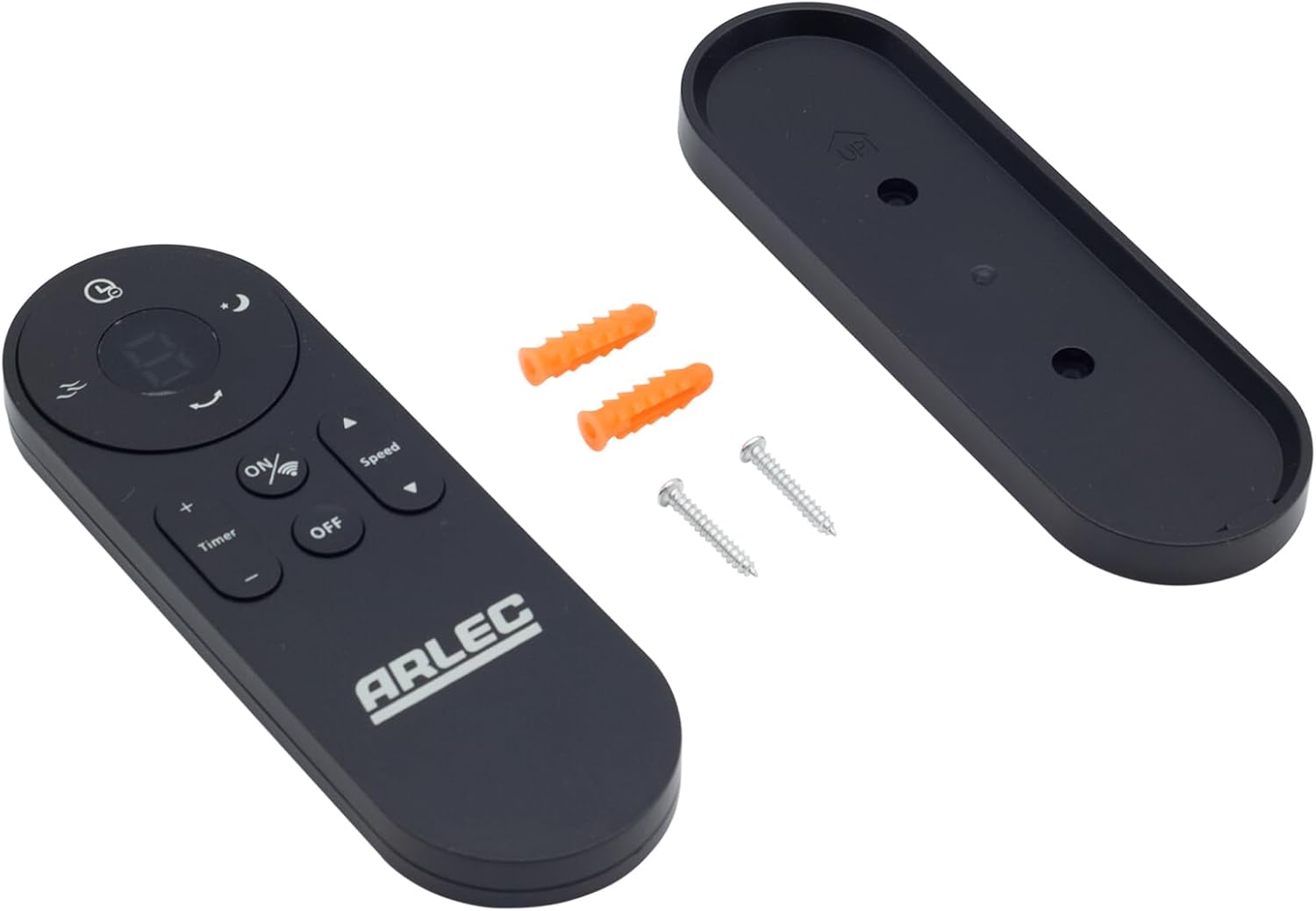
Image: Arlec Remote SS3136 shown with its included wall mount holder, two mounting screws, and two wall plugs, indicating the complete package contents.
4. Ρύθμιση
4.1 Τοποθέτηση μπαταρίας
- Εντοπίστε τη θήκη μπαταριών στο πίσω μέρος του τηλεχειριστηρίου.
- Ανοίξτε το κάλυμμα της θήκης μπαταριών.
- Insert 3 Alkaline batteries (not included) into the compartment, ensuring the correct polarity (+ and -) as indicated inside the compartment. The remote requires 3 Volts (DC).
- Κλείστε καλά το κάλυμμα της θήκης μπαταριών.
4.2 Εγκατάσταση σε τοίχο (Προαιρετικό)
- Choose a suitable location on a wall for the remote holder.
- Mark the positions for the two mounting screws using the holder as a template.
- Drill pilot holes at the marked positions. Insert the wall plugs if drilling into drywall or masonry.
- Secure the wall mount holder to the wall using the provided screws.
- Place the remote control into the installed holder for convenient storage.
5. Οδηγίες λειτουργίας
The Arlec Remote SS3136 features a simple 3-button layout for controlling your Arlec Wall Fan AWDC001HA. Ensure there is a clear line of sight between the remote and the fan's infrared receiver for optimal performance.

Εικόνα: Κοντινό πλάνο view of the Arlec Remote SS3136, highlighting its three main control buttons: ON/OFF, Speed, and Timer.
- Κουμπί ON/OFF: Πατήστε αυτό το κουμπί για να ενεργοποιήσετε ή να απενεργοποιήσετε τον ανεμιστήρα.
- Κουμπί ταχύτητας: Use this button to cycle through the available fan speed settings (e.g., Low, Medium, High).
- Κουμπί χρονοδιακόπτη: Press this button to set or adjust the fan's timer function. Refer to your Arlec Wall Fan AWDC001HA manual for specific timer intervals.
The remote operates using Infrared (IR) technology. Point the remote directly towards the fan's IR receiver. The effective operating range is up to 10 meters (approximately 33 feet).
6. Συντήρηση
- Καθάρισμα: Σκουπίστε το τηλεχειριστήριο με ένα μαλακό, στεγνό πανί. Μην χρησιμοποιείτε λειαντικά καθαριστικά ή διαλύτες.
- Αντικατάσταση μπαταρίας: Replace batteries when the remote's performance degrades or it stops responding. Always replace all 3 batteries at the same time with new alkaline batteries.
- Αποθήκευση: Εάν το τηλεχειριστήριο δεν πρόκειται να χρησιμοποιηθεί για μεγάλο χρονικό διάστημα, αφαιρέστε τις μπαταρίες για να αποφύγετε διαρροές. Φυλάξτε το σε δροσερό και ξηρό μέρος.
7. Αντιμετώπιση Προβλημάτων
| Πρόβλημα | Πιθανή αιτία | Διάλυμα |
|---|---|---|
| Remote not responding to fan. |
|
|
| Τα κουμπιά είναι κολλημένα ή δεν ανταποκρίνονται. | Ακαθαρσίες ή υπολείμματα κάτω από τα κουμπιά. | Clean the remote surface with a soft, dry cloth. Avoid liquids. |
8. Προδιαγραφές
| Ιδιότης | Λεπτομέρεια |
|---|---|
| Μοντέλο | SS3136 |
| Κατασκευαστής | Άρλεκ |
| Συμβατές Συσκευές | Arlec Wall Fan AWDC001HA |
| Τεχνολογία Συνδεσιμότητας | Υπέρυθρο (IR) |
| Αριθμός κουμπιών | 3 |
| Τύπος ελεγκτή | Έλεγχος κουμπιού |
| Τύπος μπαταρίας | Alkaline (3 required) |
| Τομtage | 3 Volt (DC) |
| Εύρος Λειτουργίας | Έως 10 μέτρα |
9. Εγγύηση και υποστήριξη
For warranty information and technical support, please refer to the documentation provided with your Arlec Wall Fan AWDC001HA or contact Arlec customer service directly. Keep your purchase receipt as proof of purchase.
For further assistance, please visit the manufacturer's official webιστότοπο ή επικοινωνήστε με τη γραμμή υποστήριξης πελατών τους.