
1. Εισαγωγή
The TOPPING D70 Pro Sabre is a high-performance Digital-to-Analog Converter (DAC) designed for audiophiles seeking exceptional sound quality. Featuring the ES9039SPro chip, advanced I/V conversion circuitry, and versatile input/output options, this device delivers precise and immersive audio reproduction. It supports various audio formats and offers a user-friendly interface for an enhanced listening experience.
2. Πληροφορίες Ασφάλειας
- Μην αποσυναρμολογείτε ή τροποποιείτε τη συσκευή. Οι μη εξουσιοδοτημένες τροποποιήσεις ενδέχεται να ακυρώσουν την εγγύηση και να θέσουν σε κίνδυνο την ασφάλεια.
- Κρατήστε τη συσκευή μακριά από νερό, υγρασία και υψηλές θερμοκρασίες.
- Βεβαιωθείτε ότι υπάρχει σωστός αερισμός γύρω από τη μονάδα για να αποφύγετε την υπερθέρμανση.
- Χρησιμοποιήστε μόνο το παρεχόμενο καλώδιο τροφοδοσίας και τα αξεσουάρ.
- Αποσυνδέστε το καλώδιο τροφοδοσίας κατά τη διάρκεια καταιγίδων με κεραυνούς ή όταν δεν χρησιμοποιείται για μεγάλα χρονικά διαστήματα.
3. Περιεχόμενα συσκευασίας
Ελέγξτε ότι όλα τα στοιχεία υπάρχουν στη συσκευασία:
- 1 x TOPPING D70 Pro Sabre DAC
- 1 x Τηλεχειριστήριο
- 1 x καλώδιο USB
- 1 x καλώδιο τροφοδοσίας AC
- 1 x κεραία Bluetooth
- 1 x Εγχειρίδιο χρήστη (αυτό το έγγραφο)

Image: TOPPING D70 Pro Sabre DAC with its included accessories and dimensions.
4. Το προϊόν τελείωσεview
4.1 Πρόσοψη

Εικόνα: Μπροστά view of the TOPPING D70 Pro Sabre, showing the full-color display and control knob.
The front panel features a full-color display (Aurora UI) that shows current input, sample rate, volume level, and other playback information. A multi-function knob allows for input selection, volume adjustment, and menu navigation. Touch buttons provide quick access to various settings and display modes like FFT and VU meters.
4.2 Πίσω πίνακας

Εικόνα: Πίσω view of the TOPPING D70 Pro Sabre, illustrating the various input and output connections.
The rear panel provides a comprehensive set of input and output options:
- Είσοδοι: USB, AES, Optical, Coaxial, Bluetooth 5.1 (with antenna connector).
- Έξοδοι: Balanced XLR, Unbalanced RCA.
- Εξουσία: Είσοδος εναλλασσόμενου ρεύματος.
5. Ρύθμιση
5.1 Ρεύμα σύνδεσης
- Connect the provided AC power cable to the power input on the rear panel of the D70 Pro Sabre.
- Plug the other end of the AC power cable into a suitable wall outlet.
5.2 Σύνδεση πηγών ήχου
Επιλέξτε μία από τις ακόλουθες μεθόδους εισαγωγής:
- Είσοδος USB: Connect a USB cable from your computer (Windows 10/11, macOS, Linux) to the USB input on the D70 Pro Sabre. For Windows systems, a driver installation may be required for ASIO applications.
- Optical/Coaxial/AES Input: Connect your digital audio source (e.g., CD player, streamer) using an optical, coaxial, or AES cable to the corresponding input on the D70 Pro Sabre.
- Είσοδος Bluetooth: Screw the Bluetooth antenna onto the designated connector on the rear panel.
5.3 Σύνδεση με ένα Amplifier/Headphones
Connect the D70 Pro Sabre to your ampσφραγιστικό ή ακουστικό amplifier using either XLR or RCA cables:
- Έξοδος XLR: For balanced connections, use XLR cables to connect the D70 Pro Sabre to an ampΣωλήνας απελευθέρωσης με εισόδους XLR.
- Έξοδος RCA: For unbalanced connections, use RCA cables to connect the D70 Pro Sabre to an ampαποσυμπιεστής με εισόδους RCA.

Image: Diagram illustrating typical connections for the D70 Pro Sabre with a PC, headphone amplifier, and headphones.
6. Οδηγίες λειτουργίας
6.1 Ενεργοποίηση/Απενεργοποίηση
Press the power button on the front panel or the remote control to turn the device on or off.
6.2 Επιλογή εισόδου
Rotate the multi-function knob or use the remote control to cycle through available inputs (USB, AES, Optical, Coaxial, Bluetooth).
6.3 Έλεγχος έντασης ήχου
Rotate the multi-function knob to adjust the output volume. The D70 Pro Sabre features independent volume memory for Single Ended, Balanced, and All modes, automatically recalling the last used volume for each output type.

Image: The D70 Pro Sabre display showing the current volume level and PCM sample επιτόκιο.
6.4 Display Modes (Aurora UI)
The D70 Pro Sabre features an intuitive Aurora UI with a full-color display. Use the touch buttons or remote to navigate and customize the display, including options for FFT (Fast Fourier Transform) and VU (Volume Unit) meters to visualize playback information.
6.5 Σύζευξη Bluetooth
- Select Bluetooth as the input source on the D70 Pro Sabre.
- On your Bluetooth device (e.g., smartphone, tablet), search for available devices and select "TOPPING D70 Pro Sabre".
- Once paired, audio will be streamed wirelessly to the DAC. The D70 Pro Sabre supports LDAC, aptX-Adaptive, aptX HD, aptX, AAC, and SBC codecs for high-quality wireless audio transmission.

Image: Illustration of Bluetooth 5.1 connectivity and performance graphs of the D70 Pro Sabre.
6.6 Βελτιστοποίηση Ηχοχρώματος
The D70 Pro Sabre allows direct switching between different timbre modes: Default, Valve, and Transistor. These modes adjust the sound characteristics to suit your preference.
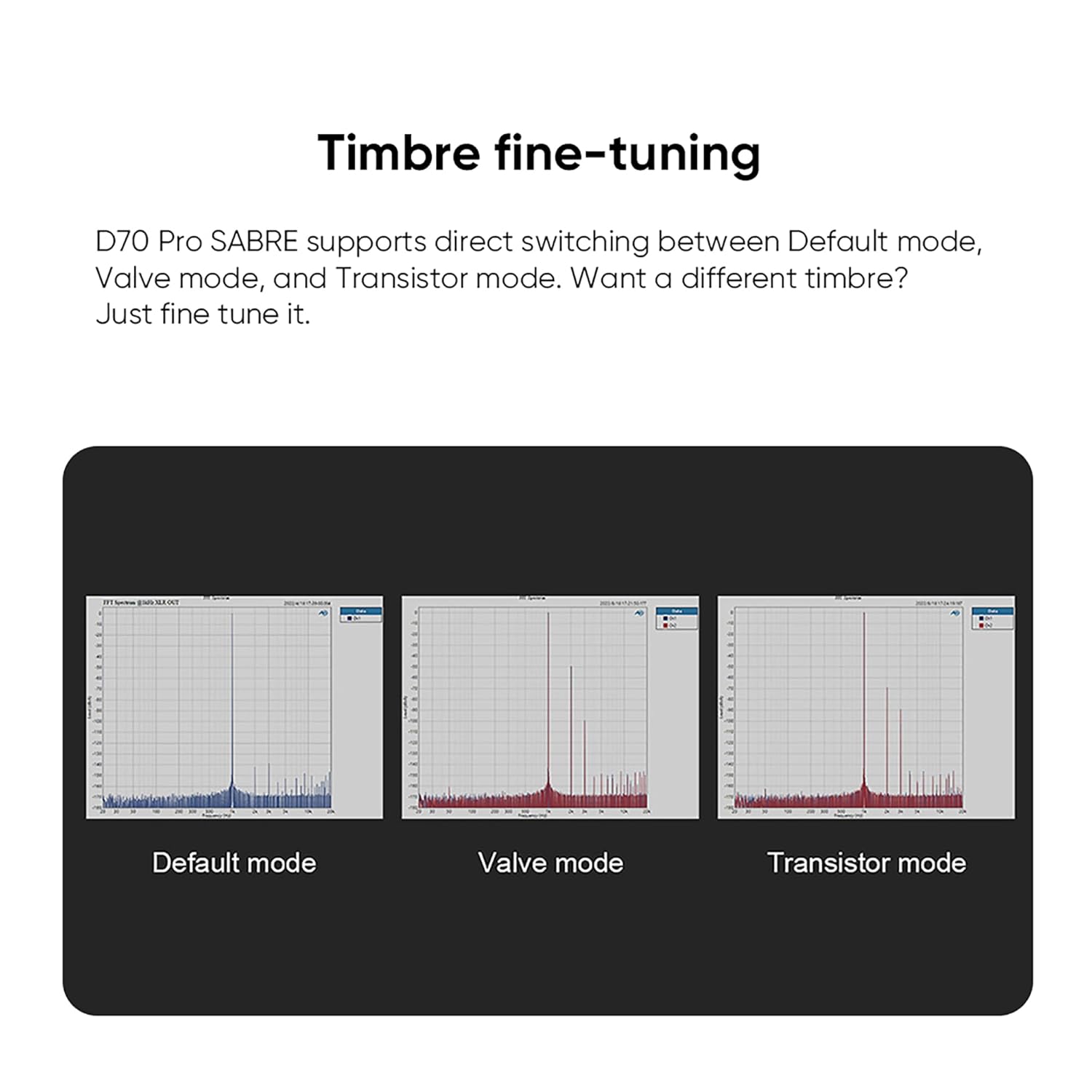
Image: Visual representation of the Default, Valve, and Transistor timbre modes available on the D70 Pro Sabre.
7. Συντήρηση
- Καθαρίζετε τη συσκευή τακτικά με ένα μαλακό, στεγνό πανί. Αποφύγετε τη χρήση λειαντικών καθαριστικών ή διαλυτών.
- Ensure all connections are secure and free from dust.
- Αποθηκεύστε τη συσκευή σε δροσερό, ξηρό μέρος όταν δεν τη χρησιμοποιείτε.
8. Αντιμετώπιση Προβλημάτων
| Πρόβλημα | Πιθανή αιτία | Διάλυμα |
|---|---|---|
| Δεν υπάρχει έξοδος ήχου | Incorrect input selected, cables loose, amplifier off, volume too low. | Verify input selection, check all cable connections, ensure amplifier is on and volume is adequate. |
| Η σύνδεση Bluetooth είναι ασταθής | Antenna not connected, interference, device too far. | Ensure Bluetooth antenna is securely attached. Reduce distance between devices. Avoid sources of interference. |
| Χωρίς οθόνη | Device not powered on, display settings. | Check power connection and power button. Adjust display settings via menu. |
| Παραμορφωμένος ήχος | Λάθος sample rate, faulty cable, source issue. | Check source sample rate matches DAC capabilities. Try different cables. Test with another audio source. |
9. Προδιαγραφές
The TOPPING D70 Pro Sabre DAC features the powerful ES9039SPro chip and advanced I/V conversion circuitry. Below are key performance parameters (Line Out/USB In@96kHz):
| Παράμετρος | Έξοδος RCA | Έξοδος XLR |
|---|---|---|
| THD+N (A-wt) @1kHz | <0.00008% | <0.00006% |
| THD @90kBw (No-wt) @20-20kHz | <0.0004% | <0.0002% |
| SNR (A-wt) @1kHz | 128dB | 133dB |
| Dynamic Range (A-wt) @1kHz | 128dB | 133dB |
| Απόκριση συχνότητας | 20Hz-20kHz (+0.05dB), 20Hz-40kHz (+0.2dB) | 20Hz-20kHz (+0.05dB), 20Hz-40kHz (+0.2dB) |
| Output Level @0dBFS (4V mode) | 2.1Vrms | 4.2Vrms |
| Output Level @0dBFS (5V mode) | 2.5Vrms | 5.0Vrms |
| Θόρυβος (A-wt) | <1.0 uVrms | <1.0 uVrms |
| Crosstalk καναλιού @1kHz | -128dB | -140dB |
| Υπόλοιπο καναλιού | 0.3dB | 0.3dB |
| Αντίσταση εξόδου | 50Ω | 100Ω |
Note: The above data is the result obtained from TOPPING's laboratory tests at AC220V 50Hz, with D70 Pro SABRE set to 5V output mode.
Γενικές προδιαγραφές:
- Κατασκευαστής: ΕΠΙΚΑΛΥΨΗ
- Αριθμός ανταλλακτικού: D70Pro SE
- Βάρος προϊόντος: 2.02 κιλά
- Διαστάσεις προϊόντος: 22.2 x 17.6 x 4.8 εκ
- Χρώμα: Μαύρος
- Τύπος διεπαφής: RCA, USB
- Minimum/Maximum Supply Voltage: 5 Volt (DC)
10. Εγγύηση και υποστήριξη
TOPPING provides after-sales support and technical assistance for its products. If you encounter any issues during purchase or use, please contact the seller directly for assistance. For general inquiries or technical support, refer to the official TOPPING webιστοσελίδα ή επικοινωνήστε με την εξυπηρέτηση πελατών τους.
The seller, AOSHIDA Audio-JP, is available to assist with product-related concerns. You can find their contact information on the Amazon platform.