
Εισαγωγή
Welcome to the user manual for your Qubo NEO2NW mobile phone. This device is specifically designed for seniors, featuring large buttons, a clear display, and essential functions for easy communication. Please read this manual carefully to understand how to use your phone safely and effectively.
Προϊόν Πάνωview
The Qubo NEO2NW is a user-friendly flip phone equipped with features tailored for convenience and safety.

Εικών: The Qubo NEO2NW flip phone in its open position, displaying its large, easy-to-read keypad and clear screen. A charging dock is visible in the background, indicating its charging method.

Εικών: A black flip phone displaying the digital time '22:10' on its screen. This image provides multiple views of the phone, highlighting its large keypad and clear display.
Βασικά Χαρακτηριστικά:
- Large buttons for easy dialing and navigation.
- Clear 2.4-inch display with adjustable font size.
- SOS emergency button for quick contact with pre-set numbers.
- Loud ringtone and speaker for improved audibility.
- Charging dock for convenient and stable charging.
- Basic functions: Call, SMS, Phonebook, Alarm Clock, Camera, FM Radio, Torch.
Ρύθμιση
1. Αποσυσκευασία και Εξαρτήματα
Carefully unpack your Qubo NEO2NW phone and ensure all components are present.

Εικών: Ένα πέραview of the box contents, including the Qubo NEO2NW phone, its charging dock, a USB cable, a power adapter, the battery, and printed user manuals.
2. Εγκατάσταση της κάρτας SIM και της μπαταρίας
- Αφαιρέστε το πίσω κάλυμμα του τηλεφώνου.
- Insert your Micro SIM card(s) into the designated slot(s) (supports Dual SIM).
- If desired, insert a MicroSD memory card (up to 32GB) into the memory card slot.
- Insert the 800mAh Lithium-ion battery, ensuring the contacts align.
- Αντικαταστήστε το πίσω κάλυμμα.
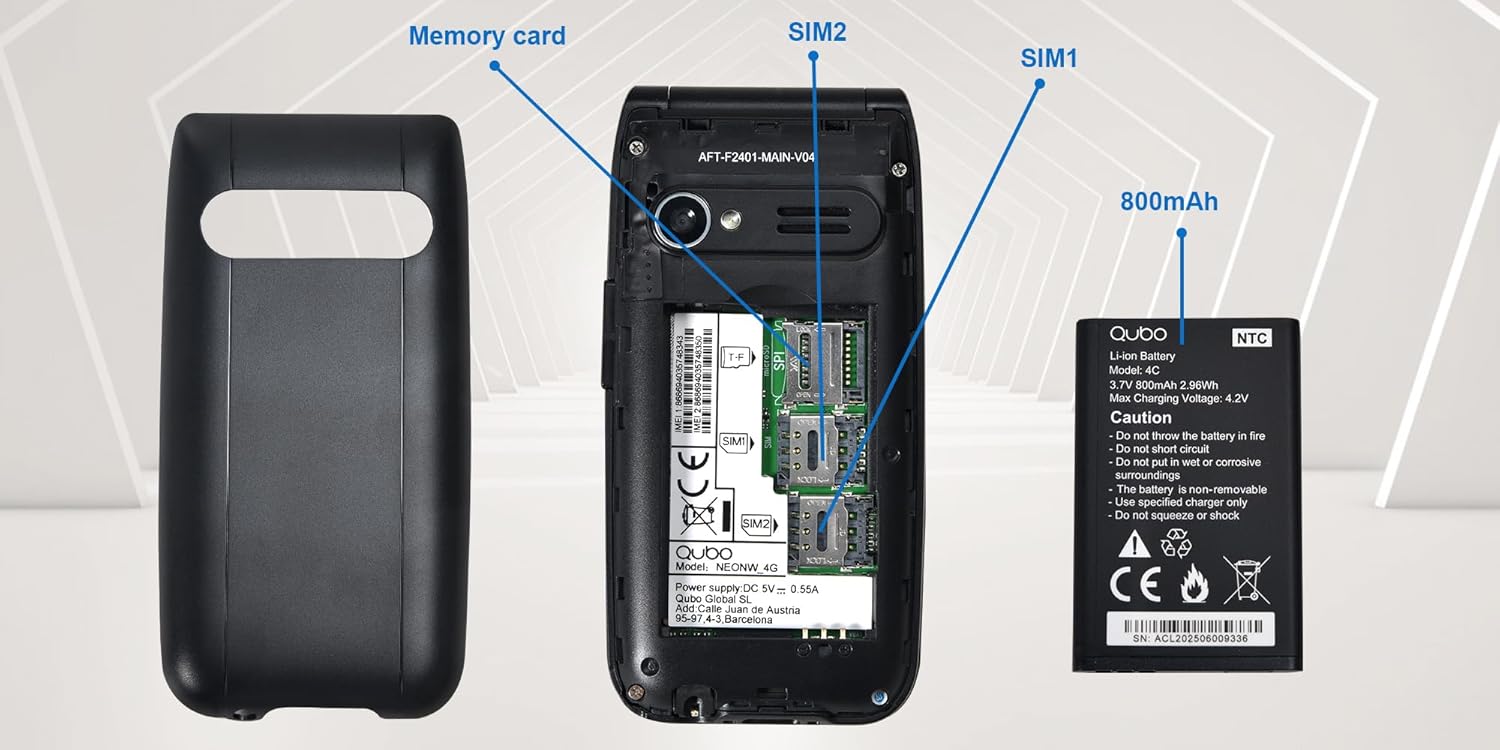
Εικών: Μια αναλυτική view of the phone's interior, highlighting the slots for two Micro SIM cards (SIM1, SIM2) and a memory card. The 800mAh battery is shown separately.
3. Φόρτιση του τηλεφώνου
Πριν από την πρώτη χρήση, φορτίστε πλήρως το τηλέφωνο.
- Connect the USB Type-C cable to the phone and the power adapter. Plug the adapter into a wall outlet.
- Alternatively, place the phone in the charging dock. Ensure it is seated correctly and the charging indicator appears on the screen.
- Η πλήρης φόρτιση διαρκεί περίπου 2.3 ώρες.

Εικών: This image shows the Type-C charging interface on the Qubo NEO2NW phone, along with an illustration of its battery compartment and icons indicating low power consumption and power-saving technology.
Οδηγίες Λειτουργίας
1. Ενεργοποίηση/Απενεργοποίηση
- Για να ενεργοποιήσετε την τροφοδοσία: Πατήστε παρατεταμένα το Ενεργοποίηση/Τερματισμός κλήσης κουμπί (κόκκινο κουμπί) μέχρι να ανάψει η οθόνη.
- Για απενεργοποίηση: Πατήστε παρατεταμένα το Ενεργοποίηση/Τερματισμός κλήσης μέχρι να εμφανιστούν οι επιλογές απενεργοποίησης και, στη συνέχεια, επιλέξτε «Απενεργοποίηση».
2. Πραγματοποίηση και λήψη κλήσεων
- Για να καλέσετε: Εισαγάγετε τον αριθμό τηλεφώνου χρησιμοποιώντας το πληκτρολόγιο και πατήστε το Κλήση κουμπί (πράσινο κουμπί).
- Από τον τηλεφωνικό κατάλογο: Navigate to the Phonebook, select a contact, and press the Κλήση κουμπί.
- Απαντώ: Όταν χτυπήσει το τηλέφωνο, πατήστε το Κλήση κουμπί.
- To end call: Πατήστε το Ενεργοποίηση/Τερματισμός κλήσης κουμπί.
3. Αποστολή και λήψη SMS
- Πλοηγηθείτε στο Μήνυμα μενού.
- Select 'New Message' to compose.
- Εισαγάγετε τον αριθμό του παραλήπτη ή επιλέξτε από τις επαφές.
- Πληκτρολογήστε το μήνυμά σας χρησιμοποιώντας το πληκτρολόγιο.
- Πατήστε «Αποστολή».
4. Λειτουργία έκτακτης ανάγκης SOS
Το κουμπί SOS σάς επιτρέπει να επικοινωνείτε γρήγορα με προκαθορισμένους αριθμούς έκτακτης ανάγκης.
- Ρύθμιση αριθμών SOS: Μεταβείτε στο Ρυθμίσεις > Ρυθμίσεις SOS to add up to 5 emergency contacts.
- Ενεργοποίηση SOS: Σε περίπτωση έκτακτης ανάγκης, πατήστε παρατεταμένα το σύνθημα κινδύνου button on the back of the phone for a few seconds.
- The phone will automatically call the pre-set numbers in sequence until one answers. It will also send an emergency SMS to these contacts.

Εικών: This image demonstrates the SOS emergency call feature. It shows the Qubo NEO2NW phone with a highlighted SOS button and a visual representation of how it connects to up to 5 pre-programmed family numbers in an emergency.
5. Display and Font Settings
The phone features a 2.4-inch screen with options for large fonts for better readability.

Εικών: The Qubo NEO2NW phone's screen displaying large, clear fonts and the option to switch font sizes. The image also points out the loud ringtone capability and the large, tactile buttons on the keypad.
Συντήρηση
- Διατηρείτε το τηλέφωνο στεγνό. Η υγρασία μπορεί να προκαλέσει ζημιά στα ηλεκτρονικά κυκλώματα.
- Αποφύγετε τις ακραίες θερμοκρασίες. Οι υψηλές θερμοκρασίες μπορούν να μειώσουν τη διάρκεια ζωής των ηλεκτρονικών συσκευών και να προκαλέσουν ζημιά στις μπαταρίες.
- Μην χρησιμοποιείτε σκληρές χημικές ουσίες, διαλύτες καθαρισμού ή ισχυρά απορρυπαντικά για να καθαρίσετε το τηλέφωνο. Σκουπίστε το με ένα μαλακό,amp πανί.
- Χειριστείτε το τηλέφωνο απαλά. Μην το ρίχνετε, μην το χτυπάτε ή το κουνάτε.
- Use only Qubo-approved batteries, chargers, and accessories.
Αντιμετώπιση προβλημάτων
| Πρόβλημα | Πιθανή αιτία | Διάλυμα |
|---|---|---|
| Το τηλέφωνο δεν ενεργοποιείται | Η μπαταρία έχει εξαντληθεί ή δεν έχει τοποθετηθεί σωστά. | Φορτίστε την μπαταρία για τουλάχιστον 30 λεπτά. Βεβαιωθείτε ότι η μπαταρία έχει τοποθετηθεί σωστά. |
| Δεν είναι δυνατή η πραγματοποίηση ή η λήψη κλήσεων | Δεν υπάρχει κάρτα SIM, η κάρτα SIM δεν είναι ενεργή ή βρίσκεται εκτός κάλυψης δικτύου. | Ensure SIM card is inserted and active. Check network signal. Contact your service provider. |
| Το κουμπί SOS δεν λειτουργεί | SOS numbers not set or incorrect. | Verify that emergency numbers are correctly configured in SOS settings. Ensure sufficient network signal. |
| Κακή ποιότητα ήχου | Low volume, poor network, or speaker/microphone obstruction. | Adjust call volume. Move to an area with better network coverage. Ensure speaker and microphone are clear. |
Προδιαγραφές
| Χαρακτηριστικό | Λεπτομέρεια |
|---|---|
| Όνομα μοντέλου | Qubo Flip Phone Charging Dock |
| Μέγεθος οθόνης | 2.4 ίντσες |
| Ανάλυση οθόνης | 240 x 320 pixel |
| Λειτουργικό σύστημα | KaiOS |
| ΕΜΒΟΛΟ | 64 MB |
| Ταχύτητα CPU | 260 MHz |
| Κυτταρική Τεχνολογία | 2G, 3G (GSM, UMTS) |
| Υποδοχές καρτών SIM | Dual SIM (Micro SIM) |
| Max Flash Memory Support | 32 GB (MicroSD) |
| Πίσω κάμερα | 0.3 MP |
| Χωρητικότητα μπαταρίας | 800 mAh (ιόντων λιθίου) |
| Χρόνος Φόρτισης | Περίπου 2.3 ώρα |
| Χρόνος Ομιλίας | Περίπου 4 ώρα |
| Χρόνος αναμονής | Περίπου 8 ημέρες |
| Συνδεσιμότητα | USB Type-C, υποδοχή ακουστικών 3.5 mm |
| Διαστάσεις | 10.5 x 5.3 x 1.7 εκ |
| Ειδικά Χαρακτηριστικά | SOS Button, FM Radio, Torch, GPS |
Εγγύηση και υποστήριξη
For warranty information, please refer to the warranty card included in your product packaging. For technical support or further assistance, please contact Qubo customer service.
- Κατασκευαστής: Qubo
- ASIN: B0C5GXR2VR
- Αριθμός μοντέλου: 6e39af81-1411-4b00-b5ae-d8778c6ab86c
- Επαφή: Refer to the official Qubo website or documentation for up-to-date contact information.