
Unitech TS100
Unitech TS100 2D Hands-Free Presentation Barcode Scanner
Εγχειρίδιο χρήστη
Εισαγωγή
This manual provides essential information for the proper setup, operation, and maintenance of your Unitech TS100 2D Hands-Free Presentation Barcode Scanner. Please read this manual thoroughly before using the device to ensure optimal performance and to prevent damage.
The Unitech TS100 is an omnidirectional USB wired desktop barcode reader designed for efficient and intuitive scanning of 1D and 2D barcodes, including PDF417 and Data Matrix, in retail and other point-of-sale environments.
Πληροφορίες Ασφάλειας
- Μην εκθέτετε τον σαρωτή σε ακραίες θερμοκρασίες, υγρασία ή άμεσο ηλιακό φως.
- Αποφύγετε την πτώση του σαρωτή ή την έκθεσή του σε ισχυρά χτυπήματα.
- Μην επιχειρήσετε να αποσυναρμολογήσετε ή να τροποποιήσετε τον σαρωτή. Αυτό θα ακυρώσει την εγγύηση.
- Χρησιμοποιήστε μόνο το παρεχόμενο καλώδιο USB για σύνδεση.
- Keep the scanning window clean to ensure accurate barcode reading.
Περιεχόμενα συσκευασίας
Ελέγξτε τα περιεχόμενα της συσκευασίας για να βεβαιωθείτε ότι υπάρχουν όλα τα είδη:
- Unitech TS100 2D Presentation Barcode Scanner
- Καλώδιο USB
- Οδηγός γρήγορης εκκίνησης (εάν υπάρχει)
Προϊόν Πάνωview
The Unitech TS100 features a compact design with a large scan window for easy barcode presentation. Its omnidirectional scanning capability allows for quick and efficient data capture.
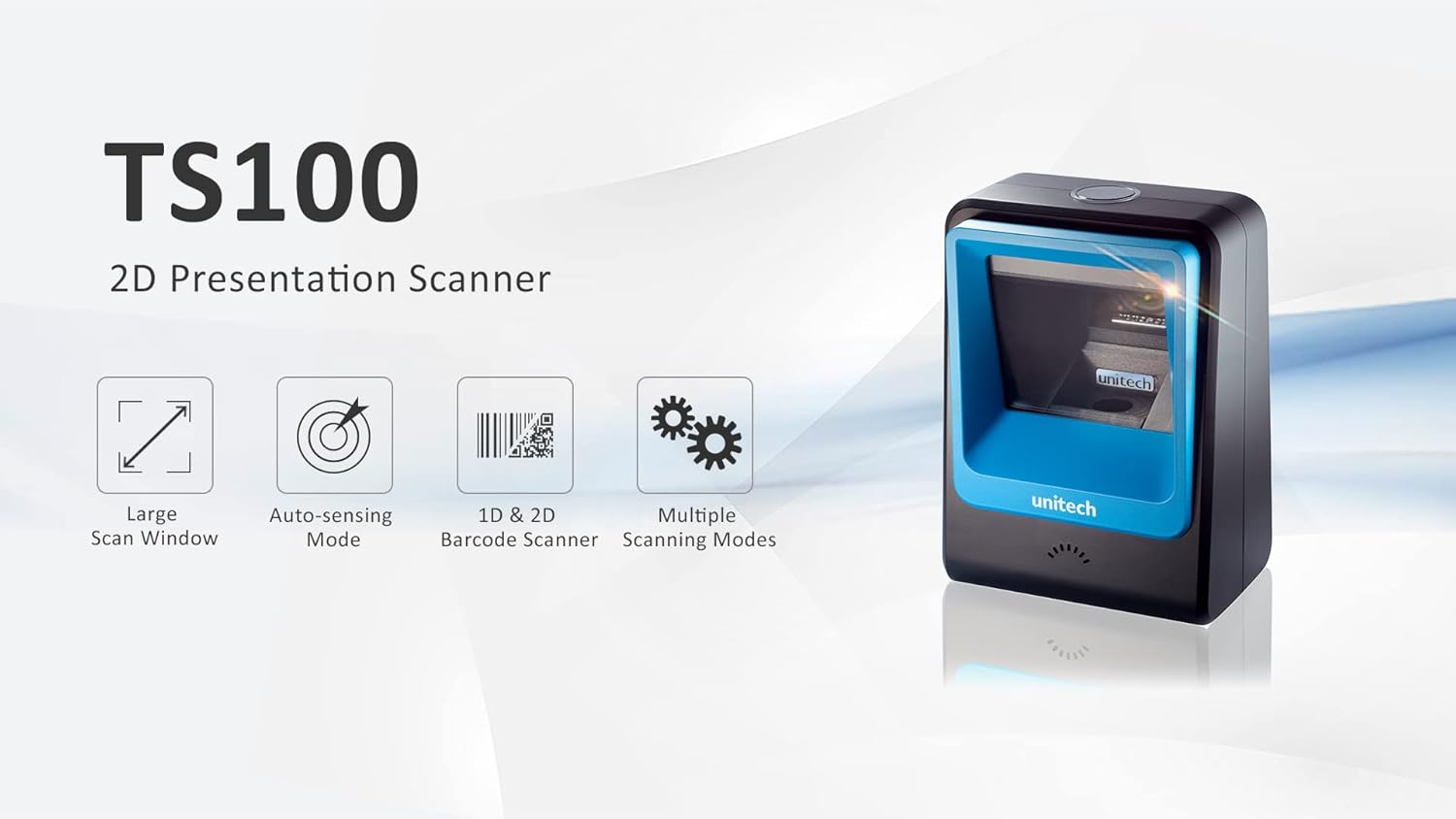
Figure 1: Unitech TS100 2D Presentation Scanner highlighting its large scan window, auto-sensing mode, 1D & 2D barcode scanning, and multiple scanning modes.

Εικόνα 2: Εμπρός view of the Unitech TS100 scanner, showing the blue scanning window and the Unitech logo.

Εικόνα 3: Πίσω view of the Unitech TS100 scanner, displaying the product label with model number TS100-SUCB00-SG and power specifications.
Ρύθμιση
Follow these steps to set up your Unitech TS100 barcode scanner:
- Αποσυσκευασία του σαρωτή: Carefully remove the TS100 scanner and its accessories from the packaging.
- Συνδέστε το καλώδιο USB: Insert the USB cable into the port at the back of the scanner.
- Σύνδεση με τη συσκευή υποδοχής: Plug the other end of the USB cable into an available USB port on your computer, laptop, or POS system.
- Εγκατάσταση προγράμματος οδήγησης: Ο σαρωτής είναι συνήθως plug-and-play. Το λειτουργικό σας σύστημα θα πρέπει να εντοπίσει και να εγκαταστήσει αυτόματα τα απαραίτητα προγράμματα οδήγησης. Περιμένετε να ολοκληρωθεί η εγκατάσταση.
- Ενεργοποίηση: The scanner will power on automatically once connected to a powered USB port. A beep and/or LED indicator will confirm it is ready for use.
Οδηγίες Λειτουργίας
The Unitech TS100 is designed for hands-free operation, offering multiple scanning modes for various applications.
Βασική σάρωση
- Place the barcode within the scanner's field of view, facing the scanning window.
- The scanner will automatically detect the barcode and emit a successful scan indication (e.g., a beep and/or green LED).
- The scanned data will be transmitted to your connected host device as keyboard input.
Λειτουργίες σάρωσης
The TS100 supports multiple scanning modes to optimize performance for different barcode types and environments:
- Κανονική λειτουργία: Standard scanning for most 1D and 2D barcodes.
- Smartphone Mode: Optimized for reading barcodes displayed on smartphone screens, which can sometimes be reflective.
- Ταχεία λειτουργία: Designed for faster scanning of multiple barcodes in quick succession.
Refer to the full programming manual (available on the Unitech website) for instructions on how to switch between these modes using configuration barcodes.
Συντήρηση
Η σωστή συντήρηση διασφαλίζει τη μακροζωία και την απόδοση του σαρωτή σας:
- Καθαρισμός του παραθύρου σάρωσης: Χρησιμοποιήστε ένα μαλακό πανί που δεν αφήνει χνούδι ελαφρά δampμε νερό ή με ένα ήπιο, μη λειαντικό καθαριστικό. Μην χρησιμοποιείτε σκληρές χημικές ουσίες ή λειαντικά υλικά.
- Καθαρισμός του εξωτερικού: Σκουπίστε το εξωτερικό του σαρωτή με ένα μαλακό, στεγνό πανί.
- Αποθήκευση: Όταν δεν χρησιμοποιείται, αποθηκεύστε τον σαρωτή σε καθαρό, ξηρό περιβάλλον, μακριά από το άμεσο ηλιακό φως και ακραίες θερμοκρασίες.
Αντιμετώπιση προβλημάτων
If you encounter issues with your TS100 scanner, refer to the table below for common problems and solutions:
| Πρόβλημα | Πιθανή αιτία | Διάλυμα |
|---|---|---|
| Ο σαρωτής δεν ενεργοποιείται. | USB cable not properly connected or host device USB port is not powered. | Βεβαιωθείτε ότι το καλώδιο USB είναι συνδεδεμένο σωστά τόσο στον σαρωτή όσο και στην κεντρική συσκευή. Δοκιμάστε μια διαφορετική θύρα USB ή κεντρική συσκευή. |
| Ο σαρωτής δεν διαβάζει γραμμωτούς κώδικες. | Barcode is damaged, poorly printed, or not supported. Scanning window is dirty. Incorrect scanning mode. | Ensure the barcode is clear and undamaged. Clean the scanning window. Verify the barcode symbology is supported. Try switching scanning modes (e.g., Smartphone Mode for screen barcodes). |
| Τα σαρωμένα δεδομένα είναι λανθασμένα ή ελλιπή. | Poor barcode quality. Scanner configuration issues. | Ensure the barcode is clear. Refer to the programming manual for advanced configuration settings. |
| Ο σαρωτής εκπέμπει ένα ηχητικό σήμα, αλλά δεν μεταδίδονται δεδομένα. | Host device not recognizing the scanner as a keyboard input. | Ensure the cursor is in a text field on your host device. Reconnect the USB cable. Restart the host device. |
Προδιαγραφές
Detailed technical specifications for the Unitech TS100 scanner:
| Χαρακτηριστικό | Προσδιορισμός |
|---|---|
| Αισθητήρας | Image Sensor with 1280x800 pixels |
| Φωτισμός | 650nm RED LED |
| Ρυθμός σάρωσης | 60 fps |
| Γωνία κλίσης | Horizontal Angle: 50°; Vertical Angle: 35° |
| Γωνία πίστας | ±65° |
| Γωνία ανατροπής | 360° |
| Οπτική ανάλυση | 1D: 4 mil; 2D: 6.7 mil |
| Printing Contrast Scale | 25% |
| Διασύνδεση κεντρικού υπολογιστή | USB |
| Διαστάσεις (Μ x Π x Υ) | 4.1 in x 5.7 in x 2.7 ίντσες (105 mm x 146 mm x 70 mm) |
| Βάρος | 12.1 oz / 345g (without cable) |
| 1D Symbologies Supported | UPC-A/E, EAN-8/13, UPC/EAN Supplementals, EAN-8 Extend, Code 128, Code 39, Code 93, Code 11, Interleaved 2 of 5, Matrix 2 of 5, Codabar, MSI Plessey, GS1 DataBar, China Postal, Korean Postal, etc. |
| 2D Symbologies Supported | PDF417, MicroPDF417, DataMatrix, DataMatrix-Inverse, Maxicode, QRcode, MicroQR, Aztec, Aztec Inverse, Han Xin, Han Xin Inverse |
| Δείκτης | LED, Buzzer |
| Θερμοκρασία λειτουργίας | 32°F έως 122°F (0°C έως 50°C) |
| Θερμοκρασία αποθήκευσης | -40°F έως 158°F (-40°C έως 70°C) |
| Σχετική Υγρασία | 0% έως 95% χωρίς συμπύκνωση |
Εγγύηση και υποστήριξη
The Unitech TS100 barcode scanner main unit comes with a 1 χρόνια εγγύηση από την ημερομηνία αγοράς. Αυτή η εγγύηση καλύπτει ελαττώματα στα υλικά και την κατασκευή υπό κανονική χρήση.
For technical support, warranty claims, or further assistance, please contact Unitech customer service or visit the official Unitech webτοποθεσία. Κρατήστε την απόδειξη αγοράς σας ως απόδειξη αγοράς για τις υπηρεσίες εγγύησης.
Unitech America Webτοποθεσία: www.unitechamerica.com
Ask a question about this manual
Ask about setup, troubleshooting, compatibility, parts, safety, or missing instructions. Manuals+ will review the question and use this page’s manual context to help answer it.