
1. Το προϊόν τελείωσεview
The Eureka Forbes Aquaguard Champ RO+UV is a 7-liter water purifier designed to provide safe drinking water through a multi-stage purification process. It combines Reverse Osmosis (RO) and Ultraviolet (UV) technologies to effectively remove impurities, bacteria, viruses, and protozoa, ensuring protection against waterborne diseases.

Image 1.1: Illustration of how the Aquaguard water purifier removes common contaminants like bacteria, protozoa, and viruses from water.
This appliance features a water level indicator for convenience and is suitable for various water sources.
2. Ρύθμιση και εγκατάσταση
Your Aquaguard Champ RO+UV water purifier comes with all necessary components for installation. It offers flexible placement options.
2.1 Αποσυσκευασία
Carefully unpack the water purifier and check for all included components:
- Water Purifier Unit
- Κάρτα Εγγύησης
- Εγχειρίδιο χρήστη (αυτό το έγγραφο)
- Installation Kit (if applicable, check packaging for details)
2.2 Επιλογές τοποθέτησης
The unit can be installed as a wall-mounted system or placed on a countertop, depending on your preference and kitchen layout.

Image 2.1: The water purifier can be placed on a counter or mounted on a wall.
2.3 Επαγγελματική Εγκατάσταση
It is recommended to have the water purifier installed by a qualified service technician to ensure proper setup and optimal performance. Refer to the warranty card for details on installation services.
3. Οδηγίες λειτουργίας
Once installed, operating your Aquaguard Champ RO+UV is straightforward.
3.1 Powering On and Initial Flush
- Ensure all connections are secure and the water supply is open.
- Συνδέστε το καλώδιο ρεύματος σε κατάλληλη πρίζα.
- Allow the purifier to fill its internal tank. The purification process will begin automatically.
- For the first use, dispense and discard the first 2-3 liters of purified water to flush out any manufacturing residues.
3.2 Ένδειξη στάθμης νερού
The water purifier is equipped with a water level indicator, allowing you to monitor the amount of purified water available in the 7-liter storage tank.

Image 3.1: Detail of the water level indicator on the side of the unit.
3.3 Purification Process
The Aquaguard Champ RO+UV utilizes a 4-stage διαδικασία καθαρισμού:
- I-Filter: Removes fine suspended particles like dust, dirt, and sand.
- Chemi-Block: Reduces excess chlorine and organic impurities.
- Μεμβράνη RO: Filters out dissolved salts, heavy metals, pesticides, and other chemical contaminants.
- UV e-boiling™: Uses ultraviolet light to eliminate bacteria, viruses, and other microorganisms, ensuring water is as safe as if it were boiled.
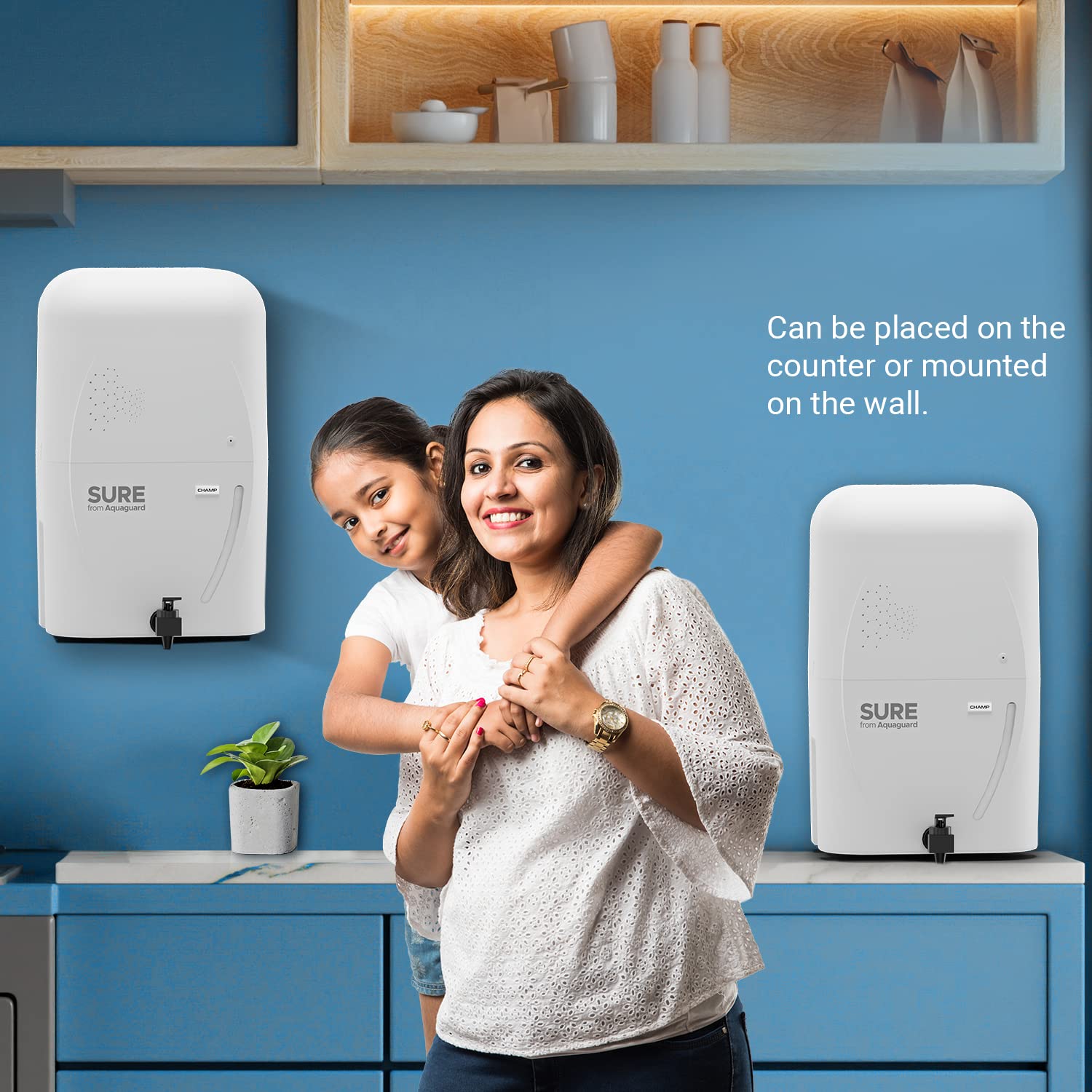
Image 3.2: Visual representation of the multi-stagδιαδικασία καθαρισμού.
4. Συντήρηση
Regular maintenance ensures the longevity and efficiency of your water purifier.
4.1 Filter and Membrane Replacement
The RO membrane and other filters have a limited lifespan. The RO membrane typically lasts for 1 year or purifies 6000 liters of water, whichever comes first. Other filters may require replacement more frequently depending on water quality and usage.

Image 4.1: RO Membrane lifespan indication.
It is crucial to replace filters and membranes as recommended by Eureka Forbes to maintain purification effectiveness. Contact customer service for filter replacement schedules and genuine parts.
4.2 Καθαρισμός της μονάδας
- Σκουπίστε το εξωτερικό του καθαριστή με ένα μαλακό,amp πανί. Μην χρησιμοποιείτε σκληρά χημικά ή λειαντικά καθαριστικά.
- Periodically clean the water dispensing tap.
- Ensure the area around the purifier is kept clean and dry.
5. Αντιμετώπιση Προβλημάτων
If you encounter any issues with your Aquaguard Champ RO+UV, refer to the following common problems and solutions. For complex issues, always contact authorized service personnel.
| Πρόβλημα | Πιθανή αιτία | Διάλυμα |
|---|---|---|
| Χωρίς παροχή νερού | No power, no water supply, or clogged filters. | Check power connection and water inlet. If filters are suspected, contact service. |
| Αργή ροή νερού | Clogged filters or RO membrane. | Filters or membrane may need replacement. Contact service. |
| Ασυνήθιστη γεύση ή οσμή | Expired filters or contamination. | Replace filters. If problem persists, contact service. |
| Η μονάδα δεν ενεργοποιείται | Power supply issue, internal electrical fault (e.g., PCB). | Check power outlet. If still unresponsive, contact service. |
Note: Do not attempt to repair the unit yourself. Always contact authorized Eureka Forbes service technicians for repairs.
6. Προδιαγραφές
| Χαρακτηριστικό | Λεπτομέρεια |
|---|---|
| Μάρκα | Γιούρικα Φορμπς |
| Όνομα μοντέλου | Sure From Aquaguard Champ RO+UV |
| Αριθμός μοντέλου | GWPDCHARU00000 |
| Ικανότητα | 7 λίτρα |
| Διαστάσεις προϊόντος (Μ x Π x Υ) | 24L x 18W x 24H εκατοστά |
| Τύπος εγκατάστασης | Βάση τοίχου |
| Μέθοδος καθαρισμού | Reverse Osmosis (RO) + Ultraviolet (UV) |
| Τύπος πηγής ενέργειας | Ενσύρματο Ηλεκτρικό |
| Μέγιστος ρυθμός ροής | 0.65 λίτρα ανά λεπτό |
| Εύρος θερμοκρασίας λειτουργίας | 10 to 40 Degrees Celsius |
| Ειδικό χαρακτηριστικό | Ένδειξη στάθμης νερού |

Image 6.1: Product dimensions (L x W x H: 24L x 18W x 24H Centimeters).
7. Εγγύηση και υποστήριξη
7.1 Πληροφορίες εγγύησης
The Eureka Forbes Aquaguard Champ RO+UV water purifier comes with a 1-year manufacturing warranty from the date of purchase. Please retain your purchase receipt and warranty card for any claims. The warranty covers manufacturing defects under normal operating conditions.
7.2 Υποστήριξη πελατών
For installation, service requests, filter replacements, or any other queries, please contact Eureka Forbes customer support. You can also book a service through the Eureka Forbes Service App.

Image 7.1: Book a service easily via the Eureka Forbes Service App.
Στοιχεία επικοινωνίας κατασκευαστή: EUREKA FORBES LTD.
For the latest contact details, please refer to the official Eureka Forbes webστον ιστότοπο ή στην κάρτα εγγύησής σας.