1. Το προϊόν τελείωσεview
The Fitbit Versa 4 is a fitness smartwatch designed to help you track your health and fitness goals. It features integrated GPS, continuous heart rate monitoring, and a long battery life, compatible with both iOS and Android devices.

Εικόνα 1.1: Εμπρός view of the Fitbit Versa 4 Smartwatch, showing the display with current time and activity metrics.
Βασικά Χαρακτηριστικά:
- 6+ days battery life with rapid charging.
- Integrated GPS for tracking outdoor activities.
- Continuous heart rate monitoring with PurePulse 2.0.
- 40+ exercise modes and automatic activity tracking.
- Sleep tracking with personalized profile, stages, and score.
- Stress management tools and daily stress score.
- SpO2 (blood oxygen saturation) monitoring.
- Smart notifications for calls, texts, and app alerts.
- Google Maps for turn-by-turn navigation on your wrist.
- Google Wallet for contactless payments.
- Built-in microphone and speaker for Bluetooth calls.
- Ανθεκτικό στο νερό έως και 50 μέτρα.
2. Ρύθμιση
2.1 Τι υπάρχει στο κουτί
- Fitbit Versa 4 Smartwatch
- Classic bands (one small, one large)
- Καλώδιο φόρτισης

Εικόνα 2.1: The Fitbit Versa 4 package contents, including the device, two band sizes, and the charging cable.
2.2 Φόρτιση της συσκευής σας
- Connect the charging cable to a USB power source (e.g., computer USB port, USB wall adapter).
- Align the charger's pins with the corresponding contacts on the back of your Versa 4. The charger is magnetic and will snap into place.
- A battery icon will appear on the screen to indicate charging.
The Versa 4 supports rapid charging, providing approximately 24 hours of battery life with just 12 minutes of charging. A full charge typically takes about 2 hours.
2.3 Installing the Fitbit App and Pairing
- Κατεβάστε την εφαρμογή Fitbit από το Apple App Store (για συσκευές iOS) ή το Google Play Store (για συσκευές Android).
- Ανοίξτε την εφαρμογή Fitbit και ακολουθήστε τις οδηγίες στην οθόνη για να δημιουργήσετε έναν λογαριασμό ή να συνδεθείτε σε έναν υπάρχοντα.
- Πατήστε τον επαγγελματία σαςfile picture in the Fitbit app, then select 'Set Up a Device'. Choose Versa 4 from the list.
- Follow the app's instructions to pair your Versa 4 with your smartphone via Bluetooth. Ensure your phone's Bluetooth is enabled.
- The app will guide you through the remaining setup steps, including connecting to Wi-Fi (if applicable) and updating firmware.
The Fitbit Versa 4 is compatible with iOS 15 or higher and Android OS 9.0 or higher.
3. Operating Your Versa 4
3.1 Πλοήγηση
- Οθόνη αφής: Swipe left, right, up, or down to navigate through menus, widgets, and notifications. Tap to select items.
- Φυσικό κουμπί: Press the button on the left side to return to the clock face or access the app menu.
- Γρήγορες ρυθμίσεις: Swipe down from the clock face to access quick settings like Do Not Disturb, Sleep Mode, and screen brightness.
- Ειδοποιήσεις: Σύρετε το δάχτυλό σας προς τα πάνω από την πρόσοψη του ρολογιού για να view πρόσφατες ειδοποιήσεις.
3.2 Παρακολούθηση φυσικής κατάστασης
The Versa 4 offers comprehensive fitness tracking capabilities:
- Συνεχής καρδιακός ρυθμός: Παρακολουθεί τον καρδιακό σας ρυθμό καθ' όλη τη διάρκεια της ημέρας και κατά τη διάρκεια της προπόνησης.
- Ενσωματωμένο GPS: Tracks your pace and distance during outdoor activities without needing your phone.
- Λεπτά ενεργής ζώνης: Κερδίστε πόντους για τον χρόνο που αφιερώνετε σε ζώνες καύσης λίπους, αερόβιας άσκησης ή μέγιστου καρδιακού ρυθμού.
- 40+ Λειτουργίες Άσκησης: Select specific modes for various activities like running, swimming, yoga, and more to get real-time stats.
- Daily Recovery Score: (Requires Fitbit Premium) Provides a personalized score indicating your body's readiness for exercise.
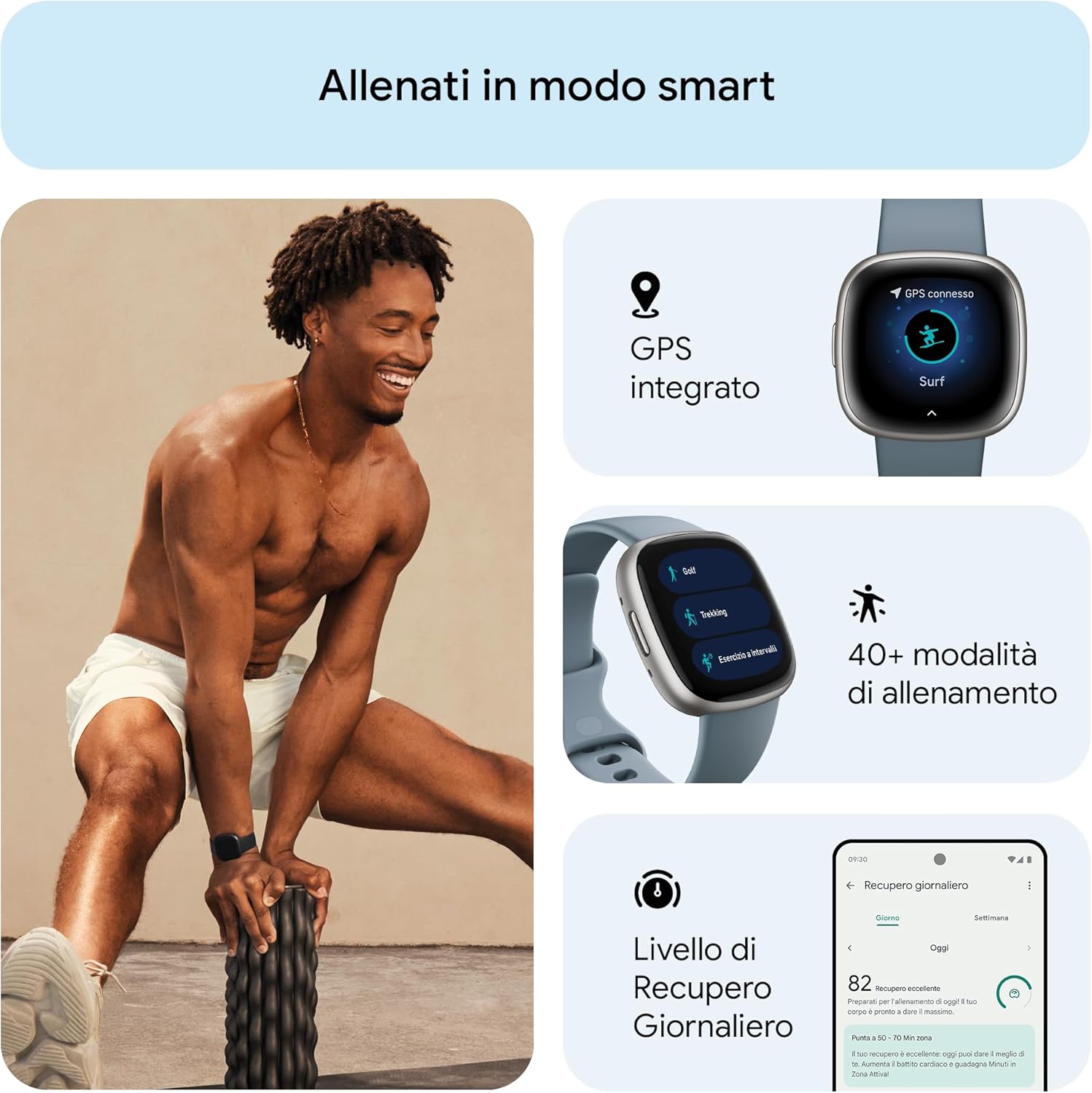
Εικόνα 3.1: Υπερview of fitness tracking features, including GPS, multiple workout modes, and daily recovery.
3.3 Παρακολούθηση Υγείας και Ευεξίας
Monitor various aspects of your health with the Versa 4:
- Παρακολούθηση ύπνου: Καταγράφει τον ύπνο σαςtages (light, deep, REM), provides a sleep score, and offers a personalized sleep profile. Smart Wake gently wakes you during an optimal sleep stage.
- Διαχείριση άγχους: Daily stress management score helps you understand your body's response to stress. Access guided breathing and mindfulness sessions.
- Παρακολούθηση SpO2: Measures your blood oxygen saturation, typically overnight, to help identify potential changes in your well-being.
- Health Metrics Dashboard: Track trends in breathing rate, heart rate variability, skin temperature, and resting heart rate in the Fitbit app.
- Παρακολούθηση εμμηνορροϊκού κύκλου: Log periods, record symptoms, and estimate fertile windows.

Εικόνα 3.2: Sleep tracking features, including analysis, scoring, smart alarms, and sleep profiles.

Εικόνα 3.3: Wellness tracking features, including continuous heart rate, heart rate variability, and SpO2 monitoring.
3.4 Έξυπνες λειτουργίες
The Versa 4 keeps you connected and convenient:
- Ειδοποιήσεις: Receive alerts for calls, text messages, calendar events, and apps like Gmail and WhatsApp directly on your wrist.
- Χάρτες Google: Get turn-by-turn directions on your wrist when your phone is nearby.
- Πορτοφόλι Google: Make contactless payments directly from your wrist using NFC.
- Βοηθός φωνής: Use the integrated Alexa to get news, weather, set alarms, control smart home devices, and more.
- Κλήσεις Bluetooth: Use the built-in microphone and speaker to take calls hands-free, redirect to voicemail, and adjust volume.
- Find My Phone: If you misplace your phone, use this feature on your Versa 4 to make it ring and vibrate.
- Γρήγορες απαντήσεις: (Android only) Respond to messages with pre-set quick replies or voice dictation.

Εικόνα 3.4: Smart features including Google Maps, notifications, and Google Wallet.
3.5 Διάρκεια ζωής μπαταρίας και φόρτιση
The Versa 4 offers 6+ days of battery life, depending on usage. Features like always-on display and frequent GPS use will reduce battery life. For rapid charging, 12 minutes of charge provides approximately 24 hours of use.

Εικόνα 3.5: Battery life and compatibility highlights of the Versa 4.
4. Συντήρηση
4.1 Cleaning Your Versa 4
- Regularly clean your watch and band to prevent skin irritation and maintain device functionality.
- Wipe the device and band with a soft, lint-free cloth. If necessary, dampen το πανί με νερό.
- Do not use soaps, sanitizers, or abrasive cleaners, as these can damage the device or cause skin irritation.
- After cleaning or sweating, ensure the device and your wrist are completely dry before wearing.
4.2 Ανθεκτικότητα στο νερό
The Fitbit Versa 4 is water resistant up to 50 meters (5 ATM). This means it is suitable for swimming and showering. However, it is not recommended for use in hot tubs, saunas, or steam rooms, as extreme temperatures can damage the device.
4.3 Φροντίδα ζώνης
The Versa 4 comes with classic silicone bands. Ensure the band is not too tight or too loose for optimal heart rate tracking and comfort. If you use other band materials (e.g., vegan leather, Horween leather, sport bands), follow specific care instructions for those materials.
5. Αντιμετώπιση Προβλημάτων
5.1 Κοινά ζητήματα και λύσεις
- Η συσκευή δεν ανταποκρίνεται: If your Versa 4 is unresponsive, try restarting it. Hold the physical button for about 10 seconds until you see the Fitbit logo.
- Ζητήματα συγχρονισμού: Ensure your phone's Bluetooth is on and the Versa 4 is within range. Open the Fitbit app to initiate a sync. If syncing fails after the battery has been depleted, manually open the app to sync once the device is charged.
- Δεν εμφανίζονται ειδοποιήσεις: Check your phone's notification settings for the Fitbit app and ensure Bluetooth is connected. Verify that 'Do Not Disturb' or 'Sleep Mode' is not active on your Versa 4.
- Ανακριβείς μετρήσεις καρδιακού ρυθμού: Ensure the watch is worn snugly but comfortably on your wrist, about a finger's width above your wrist bone. Clean the sensor on the back of the device.
- Display Not Activating with Wrist Movement: Check the quick settings to ensure 'Screen Wake' is enabled. If the issue persists, a restart may resolve it.
5.2 ενημερώσεις υλικολογισμικού
Periodically, Fitbit releases firmware updates to improve performance and add new features. Ensure your Versa 4 is charged and connected to Wi-Fi during updates. Follow the prompts in the Fitbit app to install any available updates.
6. Προδιαγραφές
| Χαρακτηριστικό | Προσδιορισμός |
|---|---|
| Αριθμός μοντέλου | FB523SRAG |
| Επίδειξη | 1.58 ίντσες (336 x 336 pixel) |
| Συνδεσιμότητα | Bluetooth v5.0, BLE, GPS, GLONASS, NFC |
| Αισθητήρες | 3-axis accelerometer, Optical heart rate sensor, SpO2 sensor, Altimeter, Ambient light sensor |
| Τύπος μπαταρίας | Πολυμερές Λιθίου |
| Διάρκεια ζωής μπαταρίας | 6+ days (typical usage) |
| Ταχεία χρέωση | 12 minutes for 24 hours of battery |
| Διαστάσεις (Ρολόι) | 40.5 x 40.5 x 11.2 mm |
| Weight (Watch) | 37.64 grams (approximate, without band) |
| Αντοχή στο νερό | 5 ATM (έως 50 μέτρα) |
| Λειτουργικό σύστημα | Proprietary Fitbit OS |
| Αρμονία | iOS 15 ή νεότερη έκδοση, Android OS 9.0 ή νεότερη έκδοση |
| Υλικό | Αλουμινίου casing |
7. Εγγύηση και υποστήριξη
7.1 Πληροφορίες εγγύησης
For detailed warranty information, please refer to the warranty card included with your product or visit the official Fitbit webιστότοπος. Οι όροι και οι προϋποθέσεις της εγγύησης ενδέχεται να διαφέρουν ανάλογα με την περιοχή και τον πωλητή.
7.2 Υποστήριξη πελατών
If you encounter any issues or have questions not covered in this manual, please visit the official Fitbit support website or contact their customer service. You can usually find contact information on the Fitbit webστον ιστότοπο ή στη συσκευασία του προϊόντος σας.
8. Σημαντικές πληροφορίες για την ασφάλεια
Please read all safety instructions before using your Fitbit Versa 4 to avoid injury or damage to the device. Keep the device and accessories out of reach of small children. Consult a medical professional before starting any new exercise program or if you have any health concerns.
9. Πόροι βίντεο
Δεν βρέθηκαν σχετικά επίσημα βίντεο προϊόντων από τον πωλητή στα παρεχόμενα δεδομένα για ενσωμάτωση σε αυτό το εγχειρίδιο.