
tectake Zola
tectake Zola Electric Height-Adjustable Desk
Μοντέλο: 404316
1. Το προϊόν τελείωσεview
The tectake Zola Electric Height-Adjustable Desk is designed to provide a dynamic and ergonomic workspace. Featuring continuous electric height adjustment, a robust particle board tabletop, and a solid steel frame, this desk offers stability and comfort. Its powerful motor ensures smooth transitions between sitting and standing positions, while the flexible frame design maximizes legroom. The integrated touchpad allows for easy height adjustments and memory function for preferred settings. An anti-collision system enhances safety during operation.

Image 1.1: The tectake Zola Electric Height-Adjustable Desk, showcasing its sleek black design and sturdy construction.
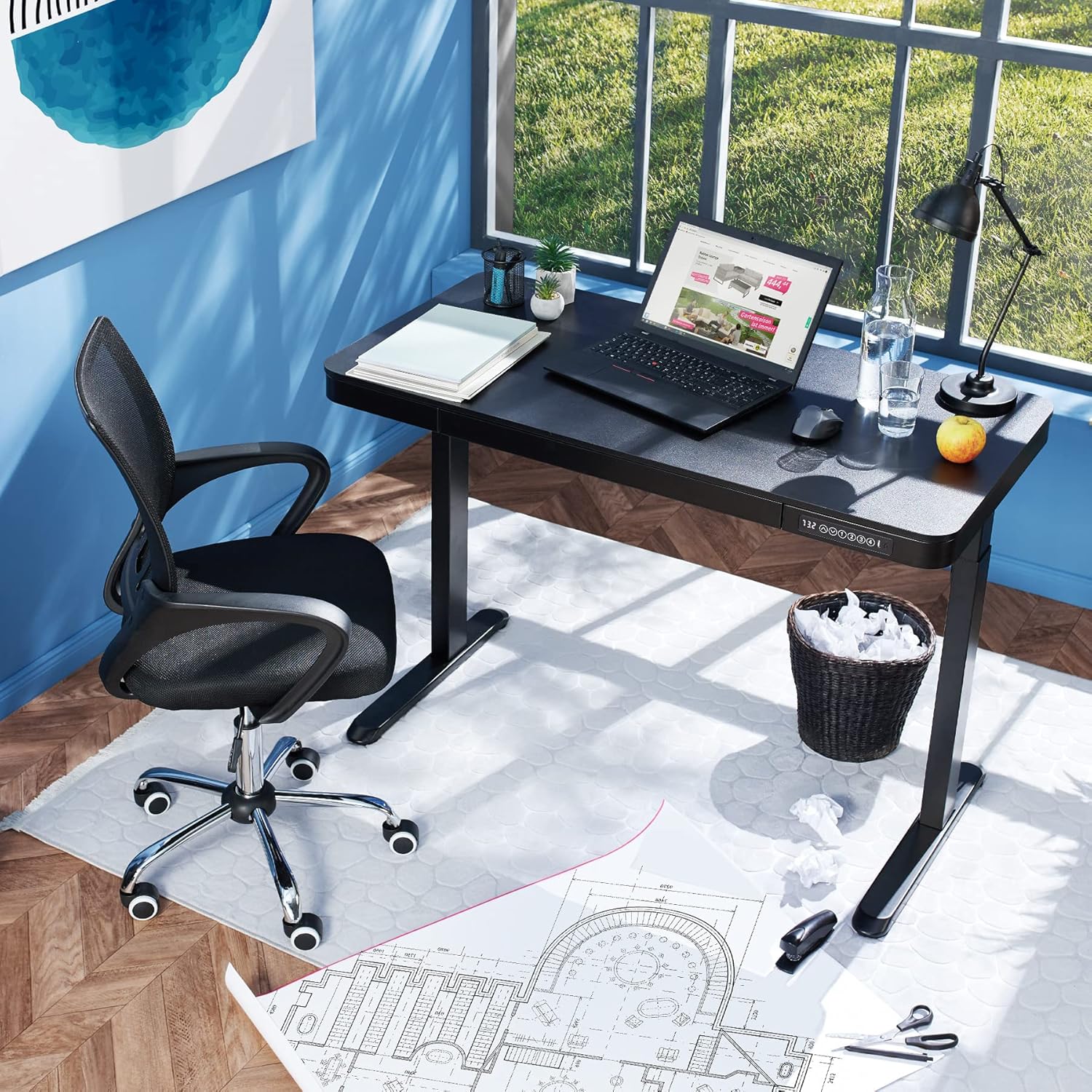
Image 1.2: The desk integrated into a modern office environment, demonstrating its practical use.
2. Οδηγίες ασφαλείας
- Διαβάστε προσεκτικά όλες τις οδηγίες πριν από τη συναρμολόγηση και τη χρήση.
- Κρατήστε τα παιδιά και τα κατοικίδια μακριά από το γραφείο κατά τη λειτουργία.
- Ensure all screws and bolts are tightened securely before use. Periodically check and re-tighten as necessary.
- Do not overload the desk. The maximum load capacity is 45 kg.
- Keep hands and fingers clear of moving parts during height adjustment. The desk is equipped with an anti-collision system, but caution is still advised.
- Χρησιμοποιείτε μόνο τον παρεχόμενο μετασχηματιστή ρεύματος.
- Do not disassemble or modify the motor or control unit. Contact qualified personnel for repairs.
- Place the desk on a level surface. Adjustable feet can compensate for minor unevenness.
3. Περιεχόμενα συσκευασίας
Βεβαιωθείτε ότι όλα τα εξαρτήματα υπάρχουν και δεν έχουν υποστεί ζημιά πριν ξεκινήσετε τη συναρμολόγηση. Εάν λείπουν ή έχουν υποστεί ζημιά κάποια εξαρτήματα, επικοινωνήστε με την υποστήριξη πελατών.
- Tabletop with integrated drawer and control panel
- Συναρμολόγηση αριστερού ποδιού
- Συνέλευση δεξιού ποδιού
- Πόδια (2x)
- Μετασχηματιστής ρεύματος και καλώδιο
- Assembly Hardware (screws, Allen key, etc.)
- Εγχειρίδιο οδηγιών (αυτό το έγγραφο)
4. Οδηγός συναρμολόγησης
Assembly is required for this product. It is recommended to have two people for easier and safer assembly. Clear a spacious area for assembly and lay out all components.
Βήμα-βήμα συναρμολόγηση:
- Attach Leg Assemblies to Tabletop: Carefully place the tabletop upside down on a soft, clean surface to prevent scratches. Align the left and right leg assemblies with the pre-drilled holes on the underside of the tabletop. Secure them using the provided screws and Allen key. Ensure the motor cables are not pinched.
- Attach Feet to Leg Assemblies: Slide the feet onto the bottom of each leg assembly. Secure them with the appropriate screws.
- Συνδέστε το καλώδιο τροφοδοσίας: Locate the power input port on the control unit (usually on the underside of the tabletop near the control panel). Connect the power cable firmly.
- Τοποθετήστε το γραφείο: With assistance, carefully flip the desk upright and move it to its desired location. Adjust the plastic feet at the bottom of the legs to ensure the desk is stable and level on uneven floors.
- Αρχική ενεργοποίηση: Plug the power adapter into a wall outlet. The control panel display should light up.

Image 4.1: Dimensional drawing of the desk, useful for planning space and assembly.

Εικόνα 4.2: Πλάγια όψη view illustrating the robust leg structure and height adjustment mechanism.
5. Οδηγός λειτουργίας
The tectake Zola desk features an intuitive control panel for easy height adjustment and memory functions.
Λειτουργίες του πίνακα ελέγχου:

Image 5.1: The control panel, showing the digital height display and control buttons.
- Ψηφιακή οθόνη: Δείχνει το τρέχον ύψος του γραφείου σε εκατοστά.
- Up/Down Arrows (↑ / ↓): Press and hold to continuously adjust the desk height upwards or downwards. Release the button to stop at the desired height.
- Memory Buttons (1, 2, 3, 4): Αυτά τα κουμπιά σάς επιτρέπουν να αποθηκεύσετε και να ανακαλέσετε έως και τέσσερις προτιμώμενες ρυθμίσεις ύψους.
- Για να αποθηκεύσετε ένα ύψος: Adjust the desk to your desired height using the up/down arrows. Press and hold one of the memory buttons (1-4) until the display flashes or beeps, indicating the height has been saved.
- Για να θυμηθείτε ένα ύψος: Simply press the corresponding memory button (1-4). The desk will automatically move to the saved height.
- Σύστημα κατά της σύγκρουσης: The desk is equipped with a sensitive anti-collision system. If the desk encounters an obstruction during height adjustment, it will stop and slightly reverse direction to prevent damage.
- USB-A and USB-C Ports: Located on the control panel, these ports can be used to charge small electronic devices.

Image 5.2: Detail of the USB-A and USB-C charging ports for convenient device charging.

Image 5.3: Visual representation of the desk's adjustable height range.
Ενσωματωμένο συρτάρι:
The desk includes a convenient integrated drawer for storing small office supplies, helping to keep your workspace tidy.

Image 5.4: The desk's integrated drawer, providing discreet storage.

Image 5.5: Detail of the drawer's smooth-gliding mechanism.
6. Συντήρηση και Φροντίδα
- Καθάρισμα: Σκουπίστε την επιφάνεια και τα πόδια του γραφείου με ένα μαλακό,amp πανί. Αποφύγετε τη χρήση σκληρών χημικών ουσιών ή λειαντικών καθαριστικών, καθώς μπορεί να προκαλέσουν ζημιά στο φινίρισμα.
- Τακτικοί έλεγχοι: Ελέγχετε περιοδικά όλες τις βίδες και τις συνδέσεις για να βεβαιωθείτε ότι παραμένουν σφιχτές. Σφίξτε ξανά εάν είναι απαραίτητο.
- Διαχείριση καλωδίων: Ensure power cables are not tangled or pinched, which could lead to damage or malfunction.
7. Αντιμετώπιση Προβλημάτων
| Πρόβλημα | Πιθανή αιτία | Διάλυμα |
|---|---|---|
| Το γραφείο δεν κινείται. | No power; cable disconnected; motor error. | Check power connection to wall outlet and desk. Ensure all cables are securely connected. Unplug and replug the power cable to reset the system. |
| Το γραφείο κινείται ανομοιόμορφα ή κάνει ασυνήθιστους θορύβους. | Loose connections; obstruction; uneven load. | Check all assembly screws for tightness. Ensure there are no obstructions under or around the desk. Distribute weight evenly on the tabletop. |
| Το σύστημα αντισύγκρουσης ενεργοποιείται συχνά. | Obstruction; sensitive setting. | Ensure the path of movement is clear. If the issue persists without clear obstruction, consult customer support. |
| Η λειτουργία μνήμης δεν λειτουργεί. | Λανθασμένη διαδικασία αποθήκευσης. | Refer to 'Operation Guide' section 5 for correct saving procedure (press and hold memory button until confirmation). |
8. Τεχνικές Προδιαγραφές
| Χαρακτηριστικό | Προσδιορισμός |
|---|---|
| Αριθμός μοντέλου | 404316 |
| Συνολικές διαστάσεις (Μ x Π x Υ) | Approx. 1204 x 604 x 720 - 1220 mm |
| Διαστάσεις επιφάνειας τραπεζιού (Μ x Π x Υ) | Περίπου 1204 x 604 x 64.5 mm |
| Διαστάσεις εσωτερικού συρταριού (Μ x Π x Υ) | Περίπου. 60 x 29 x 5 cm |
| Lifting Columns per Side | 2 main columns (approx. 4.5 x 7.5 cm) |
| Adjustable Feet Range | Περίπου 1.2 εκ |
| Επίπεδο θορύβου κινητήρα | <50 dB |
| Ταχύτητα ανύψωσης | 25 mm/s |
| Ισχύς κινητήρα | 52.2 W |
| Είσοδος Voltage | 100-240 V |
| Μήκος καλωδίου | Περίπου 310 εκ |
| Χωρητικότητα φορτίου | 45 κιλά |
| Βάρος προϊόντος | Περίπου 32 κιλά |
| Υλικά | Powder-coated steel, particle board, polychloride, ABS plastic |
9. Εγγύηση και υποστήριξη
For information regarding warranty terms and conditions, please refer to the purchase documentation or contact your retailer. For technical support or inquiries about replacement parts, please visit the official tectake webιστότοπο ή επικοινωνήστε με το τμήμα εξυπηρέτησης πελατών. Κρατήστε την απόδειξη αγοράς σας ως απόδειξη αγοράς.
Κατασκευαστής: tectake
Μάρκα: TecTake
Σχετικά Έγγραφα - Ζολά
 |
Bayt Height Adjustable Sit-Stand Desk - User Manual and Assembly Instructions Comprehensive user manual and assembly guide for the Bayt Height Adjustable Sit-Stand Desk. Learn how to assemble, operate, and maintain your electric desk. |
 |
Tectake Height-Adjustable Electric Desk Installation Guide Comprehensive installation guide for the Tectake height-adjustable electric desk, including technical specifications, assembly steps, and troubleshooting. |
 |
Roba Smart Grow N Height-Adjustable Desk - Assembly and User Guide Comprehensive assembly instructions and user guidance for the Roba Smart Grow N height-adjustable desk. It details parts, assembly steps, safety precautions, and care instructions for optimal use of this children's furniture. |
 |
Οδηγός εγκατάστασης πλαισίου γραφείου ρυθμιζόμενου ύψους tectake Οδηγός εγκατάστασης για το πλαίσιο γραφείου ρυθμιζόμενου ύψους tectake (Κωδικός είδους 402999/403000). Περιλαμβάνει τεχνικές προδιαγραφές, λίστα εξαρτημάτων, βήματα συναρμολόγησης, λειτουργία και αντιμετώπιση προβλημάτων. |
 |
Ergolink Accord Height Adjustable Desk: Operation and Settings Guide User guide for the Ergolink Accord Height Adjustable Desk, providing clear instructions on memory setting, recalling presets, and synchronizing the desk, along with essential safety tips. |
 |
Οδηγίες συναρμολόγησης και εγχειρίδιο χρήστη για όρθιο γραφείο FEZIBO Πλήρεις οδηγίες συναρμολόγησης και οδηγός χρήστη για τα ηλεκτρικά γραφεία FEZIBO με ρυθμιζόμενο ύψος, που καλύπτουν την εγκατάσταση, τη λειτουργία, την αντιμετώπιση προβλημάτων και τις τεχνικές προδιαγραφές. Περιλαμβάνει οδηγίες κατασκευής, βήμα προς βήμα συναρμολόγηση, λειτουργίες του πίνακα ελέγχου και πληροφορίες εγγύησης. |
Ask a question about this manual
Ask about setup, troubleshooting, compatibility, parts, safety, or missing instructions. Manuals+ will review the question and use this page’s manual context to help answer it.