
1. Εισαγωγή
This manual provides detailed instructions for the installation, operation, and maintenance of your DAVITU Weinview Weintek MT8051iP HMI Panel. Please read this manual thoroughly before using the device to ensure proper and safe operation. Keep this manual for future reference.
2. Πληροφορίες Ασφάλειας
Να τηρείτε πάντα τις ακόλουθες προφυλάξεις ασφαλείας για την αποφυγή τραυματισμών και ζημιών στη συσκευή:
- Βεβαιωθείτε ότι η τροφοδοσία ρεύματος ταιριάζει με τις απαιτήσεις της συσκευής.
- Μην εκθέτετε τη συσκευή σε ακραίες θερμοκρασίες, υγρασία ή άμεσο ηλιακό φως.
- Αποφύγετε την πτώση ή την έκθεση της συσκευής σε ισχυρές κρούσεις.
- Μην επιχειρήσετε να αποσυναρμολογήσετε ή να τροποποιήσετε τη συσκευή. Αναθέστε όλες τις εργασίες σέρβις σε εξειδικευμένο προσωπικό.
- Κρατήστε τη συσκευή μακριά από εύφλεκτα υλικά και υγρά.
- Χρησιμοποιείτε μόνο εγκεκριμένα αξεσουάρ και καλώδια.
3. Περιεχόμενα συσκευασίας
Βεβαιωθείτε ότι όλα τα στοιχεία υπάρχουν στη συσκευασία:
- DAVITU Weinview Weintek MT8051iP HMI Panel
- Βάσεις στήριξης (εάν υπάρχουν)
- Υποδοχή τροφοδοσίας
- Εγχειρίδιο χρήστη (αυτό το έγγραφο)
Εάν λείπουν ή έχουν υποστεί ζημιά κάποια αντικείμενα, επικοινωνήστε αμέσως με τον προμηθευτή σας.
4. Το προϊόν τελείωσεview
The DAVITU Weinview Weintek MT8051iP is a 4.3-inch Human Machine Interface (HMI) touch panel designed for industrial control and monitoring applications. It features an intuitive touch screen and Ethernet connectivity for seamless integration into various systems.
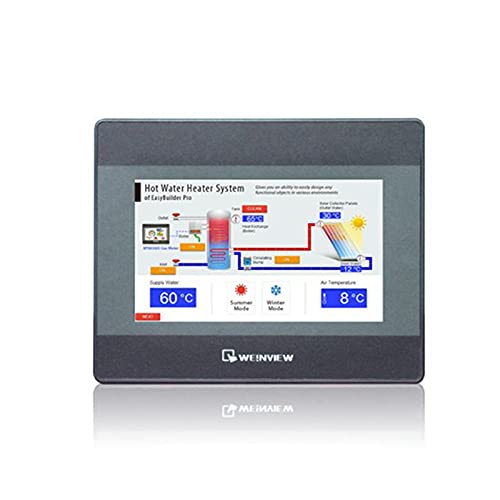
Εικόνα 1: Εμπρός view of the DAVITU Weinview Weintek MT8051iP HMI Panel, showing the 4.3-inch touch display.
4.1 Βασικά χαρακτηριστικά
- Οθόνη αφής TFT LCD 4.3 ιντσών
- Ethernet Communication Support
- Συμπαγής σχεδιασμός
- Πιστοποιημένο CE
5. Ρύθμιση και εγκατάσταση
5.1 Mounting the HMI Panel
- Prepare an opening in the control panel according to the dimensions provided in the specifications section.
- Insert the HMI panel into the opening from the front.
- Secure the panel using the provided mounting brackets from the rear. Tighten the screws evenly to ensure a snug fit without over-tightening.
5.2 Σύνδεση ρεύματος
- Ensure the power source is turned off before connecting.
- Connect the power cable to the designated power input terminal on the HMI panel.
- Connect the other end of the power cable to a compatible DC power supply (e.g., 24V DC).
- Βεβαιωθείτε ότι όλες οι συνδέσεις είναι ασφαλείς πριν βάλετε ρεύμα.
5.3 Σύνδεση Ethernet
- Connect a standard Ethernet cable (RJ45) from your network switch or PLC to the Ethernet port on the HMI panel.
- Βεβαιωθείτε ότι η σύνδεση είναι σταθερή.
6. Οδηγίες λειτουργίας
6.1 Ενεργοποίηση/Απενεργοποίηση
- Ενεργοποίηση: Apply power to the HMI panel. The device will boot up automatically. The boot screen will display, followed by the configured application interface.
- Απενεργοποιώ: To power off, disconnect the power supply. It is recommended to save any unsaved data in the application before powering off.
6.2 Χρήση της οθόνης αφής
- The HMI panel features a resistive touch screen. Use your finger or a non-sharp stylus to interact with the interface.
- Tap to select buttons, input fields, or navigate menus.
- Drag gestures may be supported by the application for scrolling or moving elements.
6.3 Διαμόρφωση λογισμικού
The HMI panel requires project files created with compatible software (e.g., EasyBuilder Pro). Refer to the software's documentation for detailed instructions on project creation, downloading, and configuration. The Ethernet port allows for project downloads and communication with PLCs or other devices.
7. Συντήρηση
7.1 Cleaning the Panel
- Turn off the device and disconnect power before cleaning.
- Χρησιμοποιήστε ένα μαλακό πανί που δεν αφήνει χνούδι δampened with a mild, non-abrasive cleaner (e.g., screen cleaner or water) to wipe the screen and casing.
- Μην χρησιμοποιείτε σκληρά χημικά, διαλύτες ή λειαντικά υλικά, καθώς αυτά μπορεί να προκαλέσουν ζημιά στην επιφάνεια.
- Βεβαιωθείτε ότι δεν εισέρχεται υγρό στη συσκευή.
7.2 Περιβαλλοντικές εκτιμήσεις
To ensure optimal performance and longevity, operate the HMI panel within its specified environmental conditions (temperature, humidity). Avoid dusty environments, as dust accumulation can affect cooling and component lifespan.
8. Αντιμετώπιση Προβλημάτων
| Πρόβλημα | Πιθανή αιτία | Διάλυμα |
|---|---|---|
| Ο πίνακας δεν ενεργοποιείται. | Δεν υπάρχει τροφοδοσία ρεύματος ή η τάση είναι εσφαλμένη.tage. | Check power cable connection. Verify power supply voltage ταιριάζει με τις προδιαγραφές. |
| Η οθόνη αφής δεν ανταποκρίνεται. | Screen calibration issue or software freeze. | Restart the device. If issue persists, check software configuration or recalibrate the touch screen (if supported by the application). |
| Ethernet communication failure. | Incorrect cable, network configuration, or device settings. | Check Ethernet cable connection. Verify IP address and network settings. Ensure PLC/device is properly configured. |
| Display shows garbled characters. | Software or firmware issue. | Re-download the project file. Contact technical support if the problem continues. |
9. Προδιαγραφές
| Χαρακτηριστικό | Λεπτομέρεια |
|---|---|
| Αριθμός μοντέλου | MT8051iP |
| Μέγεθος οθόνης | 4.3 ίντσες |
| Τύπος οθόνης | TFT LCD |
| Τύπος πίνακα αφής | Αντιστασιακός |
| Ανακοίνωση | Ethernet |
| Πιστοποίηση | CE |
| Είσοδος ισχύος | (Typical: 24V DC, check device label for exact range) |
| Θερμοκρασία λειτουργίας | (Refer to product datasheet for specific range) |
| Διαστάσεις (Π x Υ x Β) | (Refer to product datasheet for specific dimensions) |
10. Εγγύηση και υποστήριξη
10.1 Πληροφορίες εγγύησης
This product comes with a standard manufacturer's warranty. Please refer to the warranty card included with your purchase or contact your vendor for specific warranty terms and conditions. The warranty typically covers defects in materials and workmanship under normal use.
10.2 Τεχνική Υποστήριξη
For technical assistance, troubleshooting beyond this manual, or service inquiries, please contact your authorized DAVITU distributor or reseller. When contacting support, please have your product model number (MT8051iP) and purchase information readily available.
Διαδικτυακοί πόροι: For additional resources, including software downloads, FAQs, and updated documentation, please visit the official DAVITU or Weintek webτοποθεσία.