1. Εισαγωγή
The UNIWA E1801 is a user-friendly mobile phone designed with large buttons and a clear display, making it ideal for seniors. It features essential functions such as calling, messaging, FM radio, MP3/MP4 playback, and a built-in flashlight. This manual provides comprehensive instructions for setting up, operating, and maintaining your device.
2. Πληροφορίες Ασφάλειας
- Μην αποσυναρμολογείτε ή τροποποιείτε τη συσκευή.
- Χρησιμοποιείτε μόνο γνήσιες ή εγκεκριμένες μπαταρίες και φορτιστές.
- Αποφύγετε την έκθεση του τηλεφώνου σε ακραίες θερμοκρασίες, άμεσο ηλιακό φως ή υγρασία.
- Keep the phone away from medical devices to prevent interference.
- Απορρίψτε το τηλέφωνο και την μπαταρία υπεύθυνα σύμφωνα με τους τοπικούς κανονισμούς.
3. Περιεχόμενα συσκευασίας
Παρακαλούμε ελέγξτε το περιεχόμενο της συσκευασίας κατά το άνοιγμα της συσκευασίας. Εάν λείπουν ή έχουν υποστεί ζημιά κάποια είδη, επικοινωνήστε με τον πωλητή σας.
- UNIWA E1801 Mobile Phone
- BL-5C 800mAh Battery
- Αλογο αξιωματικού
- Εγχειρίδιο χρήστη (αυτό το έγγραφο)
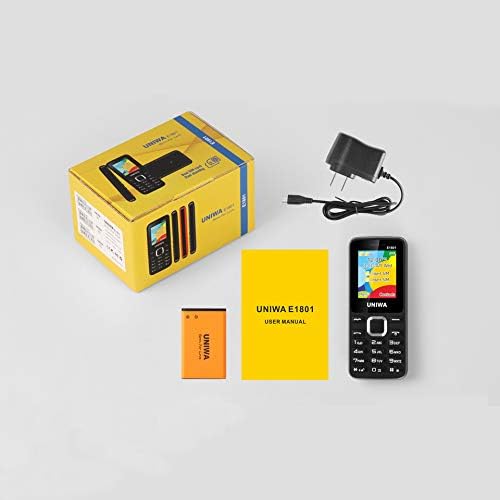
Image: Contents of the UNIWA E1801 package, showing the phone, battery, charger, and user manual neatly arranged next to the product box.
4. Το προϊόν τελείωσεview
Familiarize yourself with the physical components of your UNIWA E1801 phone.

Image: The UNIWA E1801 mobile phone held in a hand, showcasing its compact size, large keypad, and clear color display with the UNIWA logo.
- Επίδειξη: 1.77-inch QQVGA screen (160 x 128 pixels) for clear visibility.
- Πληκτρολόγιο: Large, ergonomic buttons with clear numbering for easy dialing and navigation.
- Πλήκτρα πλοήγησης: Plated navigation keys for intuitive menu control.
- Πίσω κάμερα: 0.08 MP camera for basic photo capture.
- Ομιλητής: Integrated 2030 box speaker for loud and clear audio.
- Φακός: Built-in LED flashlight for convenience.
- Non-slip Frame: Textured frame design for a secure grip.

Εικόνα: Κοντινό πλάνο view of the UNIWA E1801's keypad, highlighting the ergonomic design and the metallic finish of the central navigation keys.

Image: The UNIWA E1801 phone with an inset showing the detailed texture of its non-slip frame, designed for a secure grip.

Image: The rear of the UNIWA E1801 phone, with an overlay illustrating the powerful 2030 box speaker and its sound projection.
5. Ρύθμιση
5.1. Εγκατάσταση καρτών SIM
The UNIWA E1801 supports dual SIM cards, allowing you to use two different numbers simultaneously.
- Αφαιρέστε το πίσω κάλυμμα του τηλεφώνου.
- Locate the SIM card slots.
- Carefully insert your SIM cards into the designated slots with the gold contacts facing down.
- Βεβαιωθείτε ότι οι κάρτες SIM έχουν τοποθετηθεί σωστά.

Image: The back of the UNIWA E1801 phone with the cover removed, clearly showing the two SIM card slots and an illustration of two SIM cards.
5.2. Τοποθέτηση της μπαταρίας
- After inserting the SIM cards, place the BL-5C 800mAh battery into the battery compartment, aligning the gold contacts.
- Gently press down until the battery is securely in place.
- Επανατοποθετήστε το πίσω κάλυμμα, φροντίζοντας να ασφαλίσει στη θέση του.
5.3. Φόρτιση του τηλεφώνου
Πριν από την πρώτη χρήση, φορτίστε πλήρως την μπαταρία του τηλεφώνου.
- Connect the charger to the charging port on the phone.
- Συνδέστε το φορτιστή σε μια πρίζα.
- Η ένδειξη μπαταρίας στην οθόνη θα εμφανίζει την κατάσταση φόρτισης.
- Μόλις φορτιστεί πλήρως, αποσυνδέστε το φορτιστή.
6. Οδηγίες λειτουργίας
6.1. Ενεργοποίηση/Απενεργοποίηση
- Για ενεργοποίηση: Πατήστε παρατεταμένα το κουμπί Ενεργοποίησης/Τερματισμού Κλήσης μέχρι να ανάψει η οθόνη.
- Για απενεργοποίηση: Press and hold the Power/End Call button until the power off options appear, then select "Power off".
6.2. Πραγματοποίηση κλήσεων
- Από την οθόνη αναμονής, εισαγάγετε τον αριθμό τηλεφώνου χρησιμοποιώντας το πληκτρολόγιο.
- Πατήστε το Πράσινο κουμπί κλήσης για να ξεκινήσετε την κλήση.
- Για να τερματίσετε μια κλήση, πατήστε το κόκκινο κουμπί τερματισμού κλήσης.
6.3. Αποστολή Μηνυμάτων
- Go to "Menu" > "Messages" > "Write message".
- Εισαγάγετε το μήνυμά σας χρησιμοποιώντας το πληκτρολόγιο.
- Εισαγάγετε τον αριθμό τηλεφώνου του παραλήπτη ή επιλέξτε από τις επαφές.
- Πατήστε "Αποστολή".
6.4. Using the FM Radio
The phone features a wireless FM radio.
- Go to "Menu" > "FM Radio".
- Select "Auto search" to find available stations.
- Use the navigation keys to switch between stations.

Image: The UNIWA E1801 phone displaying its FM radio interface, showing a frequency of 142.2 MHz, with musical notes and a classic radio in the background, indicating its wireless FM capability.
6.5. Χρήση του φακού
The built-in flashlight can be easily activated.
- Typically, a dedicated button or a long press on a specific key (refer to your phone's quick guide) activates the flashlight.
- Alternatively, access it via "Menu" > "Tools" > "Flashlight".

Image: The UNIWA E1801 phone with a bright beam of light emanating from its top, illustrating the built-in flashlight function.
6.6. Άλλα χαρακτηριστικά
- MP3/MP4 Playback: Supports multimedia playback. Transfer files to a TF card (up to 16GB, not included) and access them via the "Multimedia" menu.
- Τηλεφωνικό κατάλογο: Αποθηκεύστε έως και 300 επαφές.
- Εργαλεία: Includes games, calendar, alarm clock, calculator, world clock, and recorder.
7. Συντήρηση
- Καθάρισμα: Χρησιμοποιήστε ένα μαλακό, στεγνό πανί για να καθαρίσετε την επιφάνεια του τηλεφώνου. Μην χρησιμοποιείτε υγρά καθαριστικά ή αεροζόλ.
- Αποθήκευση: Αποθηκεύστε το τηλέφωνο σε δροσερό και ξηρό μέρος, μακριά από το άμεσο ηλιακό φως και ακραίες θερμοκρασίες.
- Φροντίδα μπαταρίας: Avoid fully discharging the battery frequently. Charge it regularly to prolong its lifespan.
8. Αντιμετώπιση Προβλημάτων
| Πρόβλημα | Πιθανή αιτία | Διάλυμα |
|---|---|---|
| Το τηλέφωνο δεν ενεργοποιείται. | Η μπαταρία είναι χαμηλή ή δεν έχει τοποθετηθεί σωστά. | Φορτίστε την μπαταρία. Βεβαιωθείτε ότι η μπαταρία έχει τοποθετηθεί σωστά. |
| Δεν είναι δυνατή η πραγματοποίηση ή η λήψη κλήσεων. | Δεν υπάρχει κάρτα SIM, η κάρτα SIM δεν έχει τοποθετηθεί σωστά ή δεν υπάρχει σήμα δικτύου. | Ensure SIM card is inserted. Check network signal strength. Contact your service provider. |
| Κακή ποιότητα ήχου. | Low volume, poor network signal, or speaker/microphone obstruction. | Adjust volume. Move to an area with better signal. Clean speaker/microphone openings. |
| Η μπαταρία αδειάζει γρήγορα. | Συχνή χρήση, εφαρμογές στο παρασκήνιο ή παλιά μπαταρία. | Μειώστε τη φωτεινότητα της οθόνης. Κλείστε τις εφαρμογές που δεν χρησιμοποιούνται. Σκεφτείτε να αντικαταστήσετε την μπαταρία εάν είναι παλιά. |
9. Προδιαγραφές
| Χαρακτηριστικό | Λεπτομέρεια |
|---|---|
| Αριθμός μοντέλου | Ε1801 |
| Διαστάσεις | 108 x 45 x 14 mm |
| Βάρος | 68 γρ |
| CPU | SC6531E |
| Δίκτυο Band | 2G: GSM850/900/1800/1900 MHz, GPRS |
| Κάρτα SIM | Dual SIM, Dual Standby |
| Χωρητικότητα τηλεφωνικού καταλόγου | 300 συμμετοχές |
| Επίδειξη | 1.77 inch QQVGA, 160 x 128 pixels |
| Κάμερα | 0.08 MP Rear Camera, 640 x 480 pixels |
| Πολυμέσα | MP3, MP4 |
| Μνήμη | Supports TF card up to 16 GB (max) |
| Bluetooth | V2.1 |
| Μπαταρία | BL-5C 800mAh |
| Χρόνος Ομιλίας | Έως 240 λεπτά |
| Χρόνος αναμονής | Έως 200 ώρες |
| Γλώσσες | English, Russian, Hebrew, Arabic, French, Spanish, Polish, German, Italian, Portuguese, Chinese |
| Χαρακτηριστικά | Games, Calendar, Alarm Clock, Calculator, World Clock, Flashlight, E-book, WAP, Recorder |
10. Εγγύηση και υποστήριξη
Your UNIWA E1801 mobile phone comes with a standard manufacturer's warranty. Please refer to the warranty card included in your package for specific terms and conditions.
For technical support, troubleshooting assistance, or warranty claims, please contact your point of purchase or the official UNIWA customer service. Keep your purchase receipt as proof of purchase.
For more information, visit the official UNIWA webιστότοπο ή επικοινωνήστε με τα κανάλια υποστήριξής τους.