1. Εισαγωγή
This user manual provides comprehensive instructions for the UNIWA E1801 Senior Mobile Phone. Designed with large buttons and a clear display, this phone is ideal for users seeking simplicity and essential communication features. Please read this manual carefully before using your device to ensure proper operation and longevity.
2. Περιεχόμενα συσκευασίας
Μόλις ανοίξετε τη συσκευασία, βεβαιωθείτε ότι περιλαμβάνονται όλα τα ακόλουθα στοιχεία:
- 1 x UNIWA E1801 Mobile Phone
- 1 x BL-5C 800 mAh Battery
- 1 x Φορτιστής
- 1 x Εγχειρίδιο χρήστη (αυτό το έγγραφο)
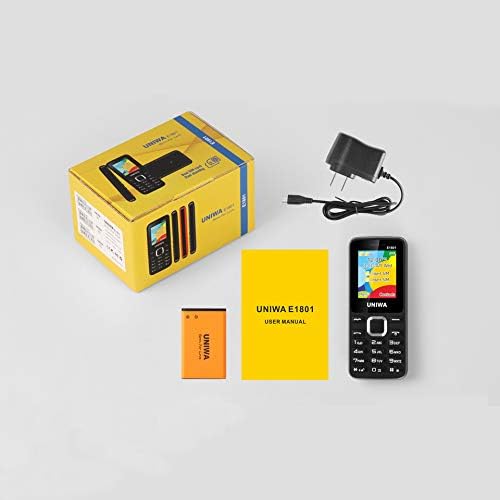
Image: Contents of the UNIWA E1801 package, including the phone, battery, charger, and user manual.
3. Η συσκευή τελείωσεview
The UNIWA E1801 features a user-friendly design with large, easy-to-press buttons and a non-slip frame for comfortable handling. It includes an ergonomic keypad with plating navigation keys for intuitive operation.
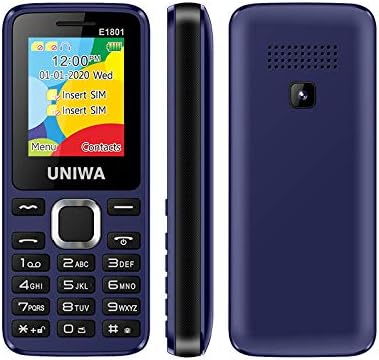
Εικόνα: Μπροστά, πλάγια και πίσω views of the UNIWA E1801 phone, highlighting its compact design.

Image: Detail showing the non-slip frame of the UNIWA E1801, designed for secure grip.

Image: Close-up of the ergonomic keypad and plating navigation keys on the UNIWA E1801.
4. Ρύθμιση
4.1. Τοποθέτηση μπαταρίας
- Αφαιρέστε το πίσω κάλυμμα του τηλεφώνου τραβώντας το απαλά από την εγκοπή.
- Align the gold contacts of the BL-5C 800 mAh battery with the contacts in the battery compartment.
- Gently press the battery down until it clicks into place.
- Replace the back cover, ensuring it snaps securely.
4.2. Εγκατάσταση κάρτας SIM
The UNIWA E1801 supports Dual SIM cards, allowing for two active phone numbers simultaneously.
- Αφού αφαιρέσετε το πίσω κάλυμμα και βγάλετε την μπαταρία (εάν είναι απαραίτητο), εντοπίστε τις υποδοχές κάρτας SIM.
- Insert your SIM card(s) into the designated slot(s) with the gold contacts facing down and the cut corner aligned correctly.
- Πιέστε απαλά την κάρτα SIM μέχρι να εφαρμόσει πλήρως.
- Επανατοποθετήστε την μπαταρία και το πίσω κάλυμμα.

Image: The dual SIM card slots of the UNIWA E1801, illustrating how SIM cards are inserted.
4.3. Φόρτιση της Συσκευής
Πριν από την πρώτη χρήση, φορτίστε πλήρως την μπαταρία του τηλεφώνου.
- Connect the charger cable to the charging port on the phone.
- Συνδέστε το φορτιστή σε μια τυπική πρίζα τοίχου.
- Η ένδειξη μπαταρίας στην οθόνη θα εμφανίζει την κατάσταση φόρτισης.
- Μόλις φορτιστεί πλήρως, αποσυνδέστε το φορτιστή.
5. Οδηγίες λειτουργίας
5.1. Ενεργοποίηση/Απενεργοποίηση
- Για ενεργοποίηση: Πατήστε παρατεταμένα το κουμπί Ενεργοποίησης/Τερματισμού Κλήσης μέχρι να ανάψει η οθόνη.
- Για απενεργοποίηση: Press and hold the Power/End Call button until the power-off options appear, then confirm.
5.2. Πραγματοποίηση κλήσεων
- Από την οθόνη αναμονής, εισαγάγετε τον αριθμό τηλεφώνου χρησιμοποιώντας το πληκτρολόγιο.
- Πατήστε το κουμπί Κλήσης (συνήθως πράσινο) για να ξεκινήσετε την κλήση.
- Για να τερματίσετε μια κλήση, πατήστε το κουμπί Τερματισμός κλήσης (συνήθως κόκκινο).
5.3. Αποστολή Μηνυμάτων
- Μεταβείτε στο μενού «Μηνύματα» από την κύρια οθόνη.
- Select 'Write Message' or 'New SMS'.
- Εισαγάγετε το μήνυμά σας χρησιμοποιώντας το πληκτρολόγιο.
- Εισαγάγετε τον αριθμό του παραλήπτη ή επιλέξτε από τις επαφές.
- Στείλτε το μήνυμα.
5.4. Επαφές
Ο τηλεφωνικός κατάλογος μπορεί να αποθηκεύσει έως και 300 επαφές.
- Προσθήκη επαφής: Go to 'Contacts' > 'Add New Contact', then enter the name and number.
- Αναζήτηση επαφής: From the 'Contacts' menu, use the navigation keys to scroll or search by name.
5.5. Ραδιόφωνο FM
The UNIWA E1801 features a wireless FM radio, allowing you to listen to your favorite stations without needing headphones as an antenna.
- Μεταβείτε στην εφαρμογή «Ραδιόφωνο FM» από το κύριο μενού.
- Use the navigation keys to scan for available stations or manually tune to a frequency.
- Adjust the volume using the side keys (if available) or navigation keys.

Image: The UNIWA E1801 showcasing its wireless FM radio feature.
5.6. Multimedia (MP3/MP4)
The phone supports MP3 audio and MP4 video playback.
- Ensure you have a TF card (up to 16GB) inserted with your media files.
- Navigate to the 'Multimedia' or 'File Manager' menu.
- Select 'MP3 Player' or 'Video Player' to browse and play your files.

Image: Illustration of the 2030 Box Speaker on the UNIWA E1801, indicating its audio capabilities.
5.7. Κάμερα
The phone is equipped with a 0.08 MP rear camera.
- Από το κύριο μενού, επιλέξτε «Κάμερα».
- Καδράρετε τη λήψη σας χρησιμοποιώντας την οθόνη ως viewευρίσκων.
- Press the designated button (usually the center navigation key) to take a photo.
5.8. Φακός
The built-in flashlight can be useful in low-light conditions.
- Refer to your phone's specific shortcut key or menu option to activate/deactivate the flashlight. This is often a long press on a specific number key or a dedicated button.

Image: The UNIWA E1801 demonstrating its integrated flashlight function.
5.9. Άλλες Λειτουργίες
The UNIWA E1801 includes several utility functions:
- Παιχνίδια: Simple pre-installed games.
- Ημερολόγιο: Για να παρακολουθείτε ημερομηνίες και γεγονότα.
- Ξυπνητηρι: Ορίστε πολλαπλά ξυπνητήρια.
- Αριθμομηχανή: Βασικές αριθμητικές συναρτήσεις.
- Παγκόσμιο ρολόι: View time in different time zones.
- Ηλεκτρονικό βιβλίο: Basic text file αναγνώστης.
- WAP: Basic internet browsing (requires GPRS data plan).
- Μηχάνημα εγγραφής: Λειτουργία εγγραφής φωνής.
6. Συντήρηση
- Καθάρισμα: Χρησιμοποιήστε ένα μαλακό, στεγνό πανί για να καθαρίσετε την επιφάνεια του τηλεφώνου. Αποφύγετε τα υγρά καθαριστικά ή τα λειαντικά υλικά.
- Φροντίδα μπαταρίας: To prolong battery life, avoid extreme temperatures. Do not leave the phone charging for excessively long periods after it is full.
- Αποθήκευση: Εάν αποθηκεύετε το τηλέφωνο για μεγάλο χρονικό διάστημα, βεβαιωθείτε ότι η μπαταρία είναι μερικώς φορτισμένη (περίπου 50%) και φυλάξτε το σε δροσερό και ξηρό μέρος.
7. Αντιμετώπιση Προβλημάτων
| Πρόβλημα | Πιθανή αιτία / Λύση |
|---|---|
| Το τηλέφωνο δεν ενεργοποιείται. | Battery is depleted. Charge the phone for at least 30 minutes. Ensure battery is correctly installed. |
| Δεν είναι δυνατή η πραγματοποίηση ή η λήψη κλήσεων. | No network signal. Move to an area with better reception. SIM card not properly inserted. Reinsert SIM card. |
| Η μπαταρία αδειάζει γρήγορα. | Background applications running. Close unused applications. Battery may be old and require replacement. |
| Δεν ακούω τον καλούντα / Ο καλών δεν με ακούει. | Volume too low. Adjust call volume. Microphone/speaker blocked. Ensure no obstructions. |
Εάν το πρόβλημα επιμένει αφού δοκιμάσετε αυτές τις λύσεις, επικοινωνήστε με την υποστήριξη πελατών.
8. Προδιαγραφές
| Χαρακτηριστικό | Λεπτομέρεια |
|---|---|
| Αριθμός μοντέλου | ECON E1801 |
| Διαστάσεις | 108 x 45 x 14 mm |
| Βάρος | 68 γρ |
| CPU | SC6531E |
| Δίκτυο Band | 2G: GSM850/900/1800/1900 MHz, GPRS |
| Κάρτα SIM | Dual-SIM, Dual-Standby |
| Χωρητικότητα τηλεφωνικού καταλόγου | 300 αριθμοί |
| Ήχος κλήσης | 64 chords, supports MP3, Midi ringtones |
| Ομιλητής | 2030 Ηχείο |
| Ραδιόφωνο FM | Ασύρματο ραδιόφωνο FM |
| Οθόνη | 1.77 inch QQVGA Display, 160 x 128 pixels |
| Κάμερα | 0.08 MP Rear Camera, 640 x 480 pixels |
| Πολυμέσα | MP3, MP4 |
| Μνήμη | Supports TF cards up to 16 GB max |
| Bluetooth | V2.1 |
| Δονητής | Ναί |
| Χρόνος Ομιλίας | Έως 240 λεπτά |
| Χρόνος αναμονής | Έως 200 ώρες |
| Γλώσσες | English, Russian, Hebrew, Arabic, French, Spanish, Polish, German, Italian, Portuguese, Chinese |
9. Εγγύηση και υποστήριξη
For warranty information and technical support, please refer to the warranty card included with your product or contact the retailer where you purchased the UNIWA E1801. You may also visit the official UNIWA website for further assistance and updated support information.