
1. Εισαγωγή
The YABER V3 Mini Bluetooth Projector is designed to provide a versatile and high-quality viewing experience for home entertainment and outdoor use. Featuring native 1280x720p resolution with 1080P support, a 6000:1 contrast ratio, and an advanced German LED light source, it delivers clear and accurate images. This projector also includes Bluetooth 5.0 for wireless audio connectivity and supports wireless screen mirroring via Anycast or Chromecast (adapters sold separately).
2. Τι υπάρχει στο κουτί
- YABER V3 Mini Bluetooth Projector
- Καλώδιο HDMI
- Καλώδιο ρεύματος
- Εγχειρίδιο χρήστη
- Καλώδιο AV
- Φακός πανάκι καθαρισμού
- Τηλεχειριστήριο (δεν περιλαμβάνονται οι μπαταρίες)
3. Χαρακτηριστικά προϊόντος
- Native 720P & 1080P Supported: Offers a native resolution of 1280x720 pixels, supporting up to 1080P input for clear images.
- Υψηλός λόγος αντίθεσης: Features a 6000:1 contrast ratio for enhanced image depth and detail.
- Συνδεσιμότητα Bluetooth 5.0: Allows wireless connection to Bluetooth headsets, speakers, and Airpods for enhanced audio.
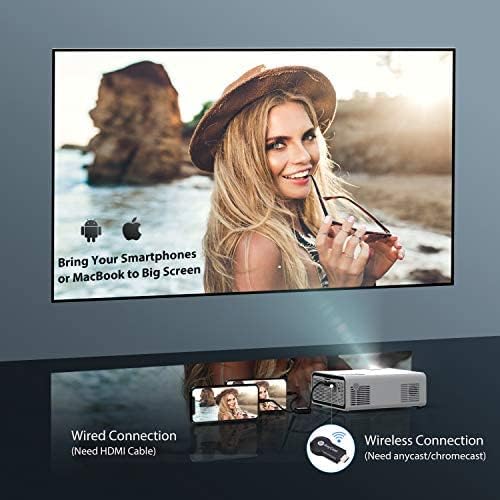
- Ασύρματο κατοπτρισμό οθόνης: Supports Anycast and Chromecast for mirroring content from smartphones and other devices (adapters required).
- Λειτουργία ζουμ: Adjusts image size from 100% to 50% using the remote control without moving the projector.
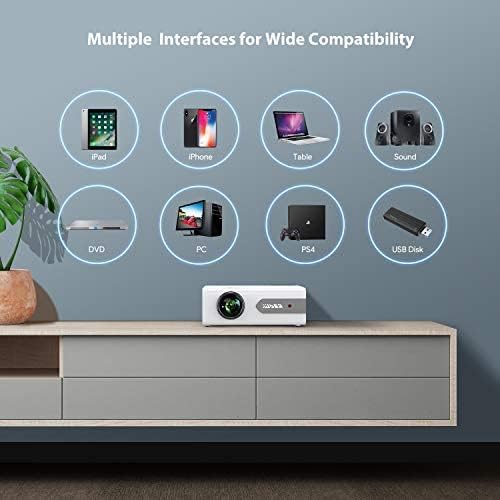
- Πολλαπλές διεπαφές: Equipped with HDMI, USB, VGA, AV, and Audio ports for wide compatibility with various devices.
- HIFI Stereo Sound: Built-in dual stereo speakers with an SRS sound system provide a good auditory experience.
- Προηγμένο σύστημα ψύξης: Designed to minimize lamp power consumption and extend lamp διάρκεια ζωής έως 100,000 ώρες.


4. Ρύθμιση
4.1 Αρχική Τοποθέτηση
Place the projector on a stable, flat surface or mount it to the ceiling. Ensure there is adequate ventilation around the projector to prevent overheating. The projection distance and screen size can be adjusted based on your viewπεριβάλλον.

4.2 Σύνδεση ρεύματος
Connect the power cord to the projector's power input and then plug it into a power outlet.
4.3 Ενεργοποίηση/Απενεργοποίηση
Πατήστε το κουμπί λειτουργίας στον προβολέα ή στο τηλεχειριστήριο για να ενεργοποιήσετε ή να απενεργοποιήσετε τη μονάδα.
5. Οδηγίες λειτουργίας
5.1 Εστίαση και Διόρθωση Keystone
Adjust the focus ring on the projector lens until the image is clear. Use the keystone correction feature (manual or digital, if available) to correct any trapezoidal distortion of the image.
5.2 Επιλογή πηγής εισόδου
Use the 'Source' button on the remote or projector to select the desired input source (HDMI, USB, VGA, AV).
5.3 Σύνδεση Bluetooth
To connect to a Bluetooth audio device:
- Ensure your Bluetooth speaker or headset is in pairing mode.
- Navigate to the Bluetooth settings on the projector.
- Επιλέξτε τη συσκευή σας από τη λίστα με τις διαθέσιμες συσκευές για σύζευξη.
- Μόλις συνδεθεί, ο ήχος θα αναπαράγεται μέσω της συσκευής Bluetooth.
Σημείωμα: The V3 mini projector supports Bluetooth output devices (speakers, headphones) but does not connect to phones/pads via Bluetooth for mirroring. Turn off Bluetooth when not in use to avoid potential issues.
5.4 Ασύρματη απεικόνιση οθόνης
The YABER V3 supports wireless screen mirroring from iOS and Android devices using an external Anycast or Chromecast dongle (purchased separately). Connect the dongle to an HDMI port and follow the dongle's instructions for mirroring.
5.5 Λειτουργία ζουμ
To adjust the image size without moving the projector, use the zoom function via the remote control. This allows you to shrink the image from 100% down to 50%.
5.6 Σενάρια χρήσης
The YABER V3 projector is suitable for various applications:
- Home Theater: Enjoy movies and shows on a large screen.
- Παιχνίδια: Συνδέστε κονσόλες παιχνιδιών για μια καθηλωτική εμπειρία.
- Outdoor Movies: Perfect for backyard movie nights in dark environments.

6. Συντήρηση
6.1 Καθαρισμός φακού
Regularly clean the projector lens using the provided lens cleaning cloth or a soft, lint-free cloth. Avoid using abrasive cleaners or harsh chemicals.
6.2 Καθαρισμός φίλτρου αέρα
Check and clean the air filter periodically to ensure proper airflow and prevent dust buildup, which can affect performance and lamp ζωή.
6.3 Lamp Ζωή
Το LED του προβολέα lamp has a lifespan of up to 100,000 hours. Proper maintenance, including adequate ventilation and cleaning, helps maximize its longevity.
7. Αντιμετώπιση Προβλημάτων
- Χωρίς εικόνα:
- Ελέγξτε αν το καλώδιο τροφοδοσίας είναι συνδεδεμένο με ασφάλεια.
- Βεβαιωθείτε ότι έχει επιλεγεί η σωστή πηγή εισόδου.
- Verify that the connected device (e.g., TV Stick, PC) is powered on and outputting a signal.
- Adjust focus and keystone.
- Χωρίς ήχο:
- Ελέγξτε τις ρυθμίσεις έντασης τόσο στον προβολέα όσο και στη συνδεδεμένη συσκευή.
- Εάν χρησιμοποιείτε Bluetooth, βεβαιωθείτε ότι η συσκευή έχει συζευχθεί και συνδεθεί σωστά.
- If using an external speaker via AUX, ensure the cable is fully inserted.
- Some content (e.g., certain streaming services) may have audio format incompatibilities; try a different source or content.
- Θολή εικόνα:
- Ρυθμίστε τον δακτύλιο εστίασης στον φακό.
- Βεβαιωθείτε ότι η επιφάνεια προβολής είναι επίπεδη και ο προβολέας σταθερός.
- Καθαρίστε τον φακό του προβολέα.
- Το τηλεχειριστήριο δεν λειτουργεί:
- Αντικαταστήστε τις μπαταρίες στο τηλεχειριστήριο.
- Βεβαιωθείτε ότι δεν υπάρχουν εμπόδια μεταξύ του τηλεχειριστηρίου και του δέκτη υπερύθρων του προβολέα.
- Υπερθέρμανση:
- Βεβαιωθείτε ότι υπάρχει επαρκής αερισμός γύρω από τον προβολέα.
- Clean the air filter and vents to remove dust.
- Avoid operating in excessively hot environments.
8. Προδιαγραφές
| Αριθμός μοντέλου | V3 |
| Ανάλυση οθόνης | Native 1280 x 720 (Supports 1080P) |
| Αναλογία αντίθεσης | 6000:1 |
| Αναλογία διαστάσεων | 16:9 / 4:3 |
| Πηγή φωτός | LED |
| Lamp Ζωή | Έως 100,000 ώρες |
| Τεχνολογία Συνδεσιμότητας | 3.5mm Jack, Bluetooth, HDMI, USB, VGA, AV |
| Έκδοση Bluetooth | 5.0 |
| Διαστάσεις προϊόντος | 8.19 x 6.61 x 3.07 ίντσες |
| Βάρος αντικειμένου | 2.2 λίρες |
| Προτεινόμενες χρήσεις | Home Cinema, Gaming, Business (not recommended for professional presentations) |
9. Εγγύηση και υποστήριξη
YABER provides a 6-month return policy and 3-year repair service for the V3 Mini Bluetooth Projector. Lifetime professional technical support is also available. For any issues or inquiries, please contact YABER customer service.