
TENMIYA A200
Εγχειρίδιο χρήστη για φορητό ηχείο Bluetooth TENMIYA A200
Μοντέλο: A200
Εισαγωγή
The TENMIYA A200 Portable Bluetooth Speaker is designed to provide high-quality audio with versatile connectivity options. Featuring Bluetooth 5.0, FM radio, TF card, USB, and AUX input, this speaker offers a comprehensive audio experience for various environments, from home to outdoor gatherings. Its compact design and remote control functionality ensure ease of use and portability.

Image: The TENMIYA A200 speaker in beech color, showcasing its front panel with a large speaker grille, digital display, control buttons, and a remote control placed in front.
Τι υπάρχει στο κουτί
Ελέγξτε τα περιεχόμενα της συσκευασίας για να βεβαιωθείτε ότι όλα τα είδη υπάρχουν και είναι σε καλή κατάσταση:
- 1 x TENMIYA A200 Bluetooth Speaker
- 1 x Τηλεχειριστήριο
- 1 x καλώδιο AUX (3.5 mm)
- 1 x Καλώδιο φόρτισης USB
- 1 x Εγχειρίδιο χρήστη (αυτό το έγγραφο)
Ρύθμιση
1. Φόρτιση του ηχείου
Before first use, fully charge the speaker. Connect the provided USB charging cable to the speaker's DC 5V input port and the other end to a USB power adapter (not included) or a computer USB port. The charging indicator will show the charging status. A full charge typically takes about 3-4 hours.
2. Ενεργοποίηση/Απενεργοποίηση
Locate the power switch on the side of the speaker. Slide it to the "ON" position to power on the speaker. Slide it to the "OFF" position to power off.
3. Σύνδεση Bluetooth
- Power on the speaker. It will automatically enter Bluetooth pairing mode, indicated by a flashing Bluetooth icon on the digital display.
- Στη συσκευή σας (smartphone, tablet, φορητό υπολογιστή), ενεργοποιήστε το Bluetooth και αναζητήστε διαθέσιμες συσκευές.
- Select "TENMIYA A200" from the list of devices.
- Once connected, the speaker will emit a confirmation sound, and the Bluetooth icon on the display will stop flashing.

Image: The TENMIYA A200 speaker displaying "Bluetooth 4.1" (note: product specs state 5.0, this image might be older) and a smartphone screen showing music playback, illustrating Bluetooth connectivity.
4. Σύνδεση εισόδου AUX
For devices without Bluetooth, use the provided 3.5mm AUX cable. Connect one end to the speaker's AUX input port and the other end to the audio output jack of your device (e.g., MP3 player, computer, TV). The speaker will automatically switch to AUX mode.
5. Κάρτα TF και αναπαραγωγή USB
Insert a TF (MicroSD) card or a USB flash drive containing MP3 music files into the respective slots on the side of the speaker. The speaker will automatically detect the storage device and begin playing music.
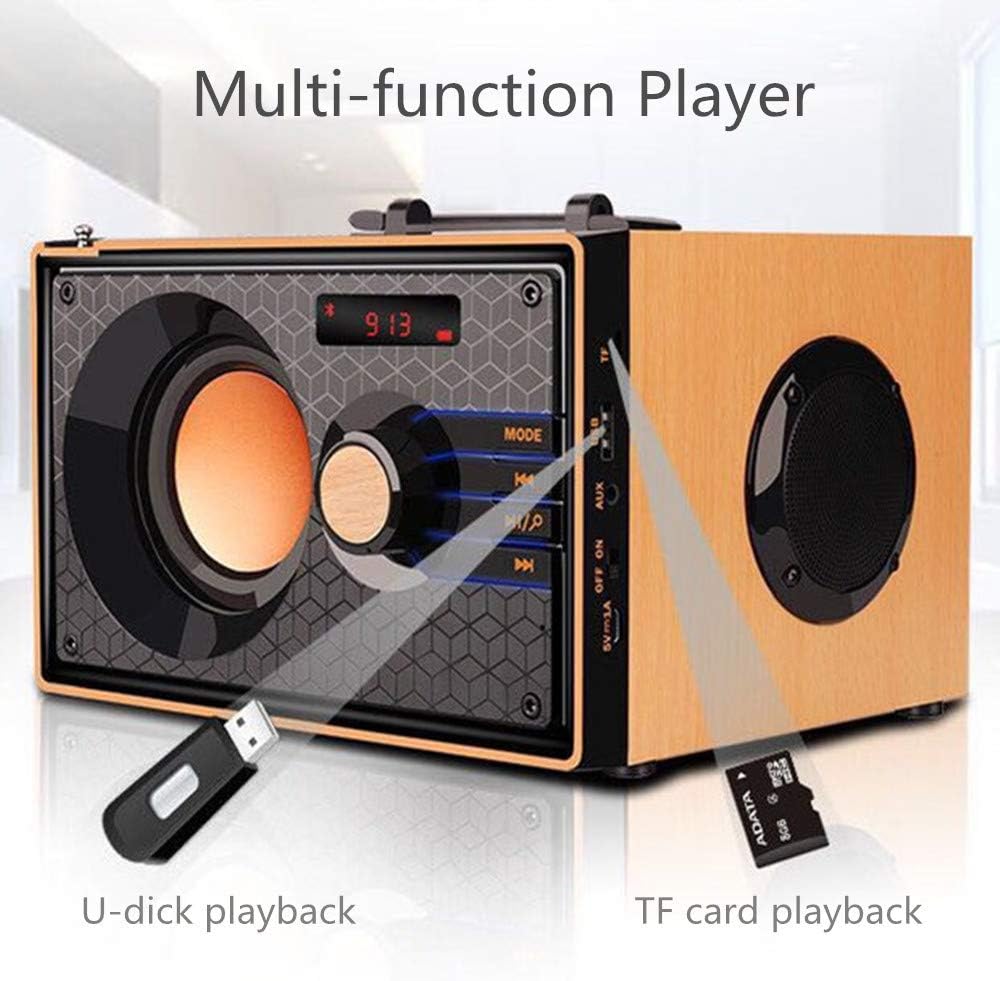
Image: A close-up of the side panel of the TENMIYA A200 speaker, highlighting the USB and TF card input slots with a USB drive and TF card inserted, demonstrating multi-function playback.
Οδηγίες Λειτουργίας
1. Επιλογή τρόπου
Πατήστε το ΤΡΟΠΟΣ button on the speaker's front panel or the remote control to cycle through available modes: Bluetooth, FM Radio, AUX, TF Card, and USB.
2. Έλεγχος έντασης
Rotate the large knob on the front panel clockwise to increase volume and counter-clockwise to decrease volume. Alternatively, use the VOL+ και ΤΟΛ- κουμπιά στο τηλεχειριστήριο.
3. Playback Control (Bluetooth, TF Card, USB)
- Πατήστε το Αναπαραγωγή/Παύση κουμπί (▶▶) to play or pause the current track.
- Πατήστε το Προηγούμενο κομμάτι κουμπί (◀◀) to go to the beginning of the current track or the previous track.
- Πατήστε το Επόμενο κομμάτι κουμπί (▶▶) για μετάβαση στο επόμενο κομμάτι.
4. Λειτουργία ραδιοφώνου FM
- Μετάβαση σε λειτουργία FM χρησιμοποιώντας το ΤΡΟΠΟΣ κουμπί.
- To automatically scan and save available stations, press and hold the Αναπαραγωγή/Παύση button. The speaker will scan and store stations with strong signals.
- To manually tune or navigate through saved stations, use the Προηγούμενο κομμάτι και Επόμενο κομμάτι κουμπιά.
- Extend the telescopic antenna on the back of the speaker for improved FM reception.

Image: A man relaxing on a couch, listening to the TENMIYA A200 speaker which has its telescopic antenna extended, indicating FM radio functionality.
5. Χρήση τηλεχειριστηρίου
The included remote control provides convenient access to all speaker functions from a distance of up to 10 feet. Functions include power on/off, mode selection, volume control, track navigation, play/pause, and direct station input for FM radio (if supported by the remote's number pad).
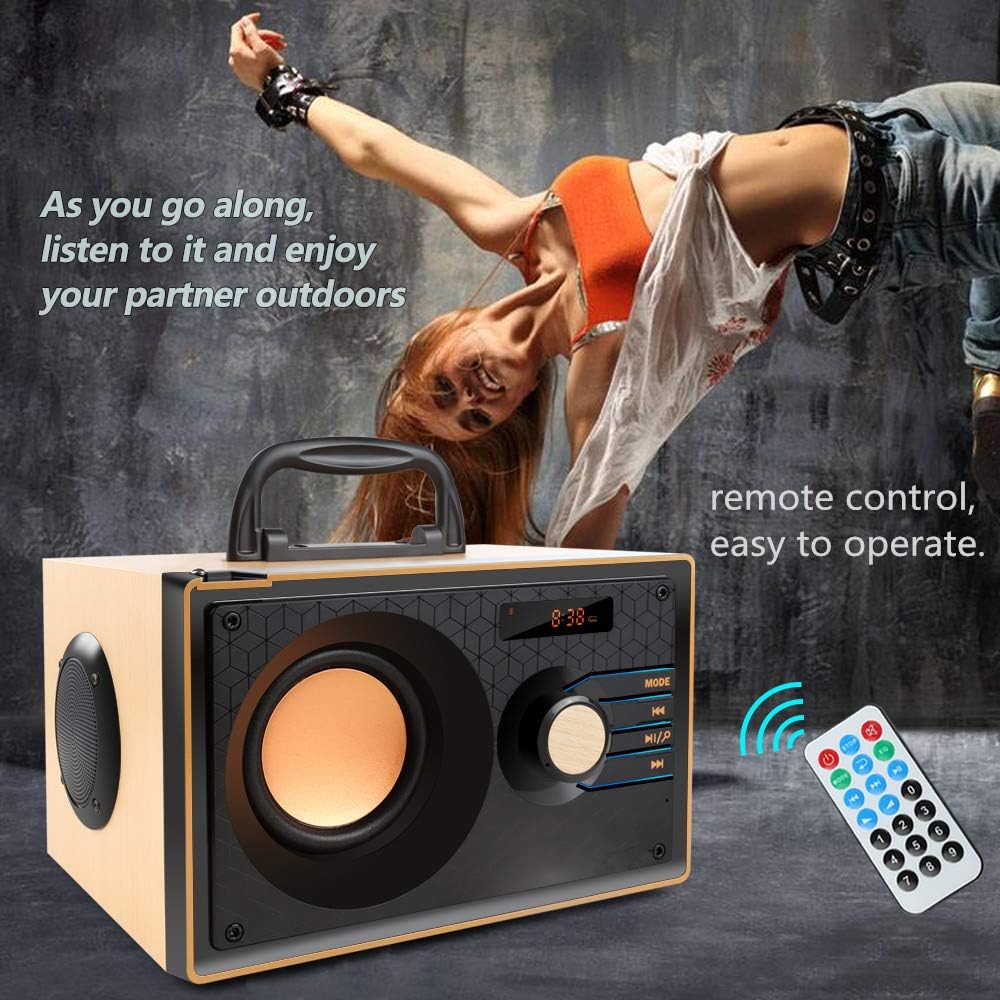
Image: The TENMIYA A200 speaker with its remote control, emphasizing the ease of operation from a distance.
Συντήρηση
- Κρατήστε το ηχείο μακριά από νερό, υγρασία και άμεσο ηλιακό φως.
- Καθαρίστε το ηχείο με ένα μαλακό, στεγνό πανί. Μην χρησιμοποιείτε λειαντικά καθαριστικά ή διαλύτες.
- Αποφύγετε την πτώση του ηχείου ή την έκθεσή του σε ισχυρές κρούσεις.
- Αποθηκεύστε το ηχείο σε δροσερό και ξηρό μέρος όταν δεν το χρησιμοποιείτε για μεγάλα χρονικά διαστήματα.
Αντιμετώπιση προβλημάτων
| Πρόβλημα | Πιθανή αιτία | Διάλυμα |
|---|---|---|
| Το ηχείο δεν ενεργοποιείται. | Low battery; Power switch is off. | Φορτίστε το ηχείο. Βεβαιωθείτε ότι ο διακόπτης λειτουργίας βρίσκεται στη θέση "ON". |
| Κανένας ήχος. | Η ένταση ήχου είναι πολύ χαμηλή. Έχει επιλεγεί λανθασμένη λειτουργία. Η συσκευή δεν έχει συνδεθεί σωστά. | Increase volume; Press MODE button to select correct input; Reconnect device. |
| Η σύνδεση Bluetooth αποτυγχάνει. | Το ηχείο δεν είναι σε λειτουργία σύζευξης. Το Bluetooth της συσκευής είναι απενεργοποιημένο. Πολύ μακριά από το ηχείο. | Ensure speaker is in Bluetooth mode and flashing; Turn on device Bluetooth; Move device closer (within 10 meters/33 feet). |
| Κακή λήψη ραδιοφώνου FM. | Η κεραία δεν έχει επεκταθεί. Περιοχή ασθενούς σήματος. | Fully extend the telescopic antenna; Try repositioning the speaker for better signal. |
| Το τηλεχειριστήριο δεν λειτουργεί. | Battery depleted; Obstruction between remote and speaker; Too far from speaker. | Replace remote battery; Remove obstructions; Move closer to speaker (within 10 feet). |
Προδιαγραφές
| Χαρακτηριστικό | Λεπτομέρεια |
|---|---|
| Μάρκα | TENMIYA |
| Μοντέλο | Α200 |
| Ισχύς εξόδου ηχείου | 10W (5W + 2.5W x 2) |
| Μονάδα ηχείων | 3" + 2" x 2 |
| Απόκριση συχνότητας | 60Hz - 20KHz |
| Έκδοση Bluetooth | 5.0 |
| Εύρος Bluetooth | Έως 10 μέτρα (33 πόδια) |
| Χωρητικότητα μπαταρίας | 2200 mAh |
| Χρόνος Φόρτισης | Περίπου 3-4 ώρες |
| Χρόνος παιχνιδιού | Περίπου 8 ώρες (σε όγκο 40%) |
| Ισχύς εισόδου | DC 5V |
| Διαστάσεις (Μ x Π x Υ) | 7.5 x 6.1 x 4.7 ίντσες (190 x 155 x 120 mm) |
| Βάρος αντικειμένου | 2.91 λίρες |
| Υποστηριζόμενες Λειτουργίες | Bluetooth, FM Radio, TF Card, USB, AUX Input |
| Μέθοδος Ελέγχου | Manual buttons, Remote Control |

Image: The TENMIYA A200 speaker with its dimensions labeled (190mm length, 155mm depth, 120mm height), illustrating its compact size.
Εγγύηση και υποστήριξη
The TENMIYA A200 Portable Bluetooth Speaker comes with a worry-free 12-month warranty. If you encounter any issues or have questions regarding your product, please contact our customer service team. We are committed to providing the best customer service and will respond to your inquiries within 24 hours.
For support, please refer to the contact information provided on the product packaging or the seller's page where you purchased the item.
Ask a question about this manual
Ask about setup, troubleshooting, compatibility, parts, safety, or missing instructions. Manuals+ will review the question and use this page’s manual context to help answer it.