
Midiplus Origin 37
Εγχειρίδιο χρήστη για χειριστήριο πληκτρολογίου MIDI USB MIDI 37 της midiplus Origin
Model: Origin 37 | Brand: Midiplus
1. Εισαγωγή
The midiplus Origin 37 is a versatile USB MIDI Keyboard Controller designed for musicians and producers. It features 37 full-size sensitive keys, 8 real-time controller knobs, 9 real-time controller sliders, and essential performance controls like pitch bend and modulation wheels. This manual provides detailed instructions for setting up, operating, and maintaining your Origin 37 controller to ensure optimal performance and longevity.
2. Πληροφορίες Ασφάλειας
- Μην εκθέτετε τη μονάδα σε βροχή, υγρασία ή ακραίες θερμοκρασίες.
- Αποφύγετε την τοποθέτηση της μονάδας κοντά σε πηγές θερμότητας, όπως καλοριφέρ, θερμαντικά σώματα, σόμπες ή άλλες συσκευές (συμπεριλαμβανομένων ampσβηστήρες) που παράγουν θερμότητα.
- Χρησιμοποιείτε μόνο προσαρτήματα/αξεσουάρ που καθορίζονται από τον κατασκευαστή.
- Καθαρίστε μόνο με στεγνό πανί.
- Μην φράζετε κανένα άνοιγμα εξαερισμού. Εγκαταστήστε σύμφωνα με τις οδηγίες του κατασκευαστή.
- Προστατέψτε το καλώδιο τροφοδοσίας από το να πατηθεί ή να τσιμπήσει, ιδιαίτερα στις πρίζες, στις πρίζες και στο σημείο που εξέρχονται από τη συσκευή.
- Αποσυνδέστε αυτή τη συσκευή από την πρίζα κατά τη διάρκεια καταιγίδων ή όταν δεν χρησιμοποιείται για μεγάλες χρονικές περιόδους.
3. Περιεχόμενα συσκευασίας
Ελέγξτε ότι όλα τα είδη που αναφέρονται παρακάτω περιλαμβάνονται στη συσκευασία σας:
- midiplus Origin 37 USB MIDI Keyboard Controller
- Καλώδιο USB
- Εγχειρίδιο κατόχου (αυτό το έγγραφο)
4. Το προϊόν τελείωσεview
Familiarize yourself with the various components and controls of your Origin 37 controller.
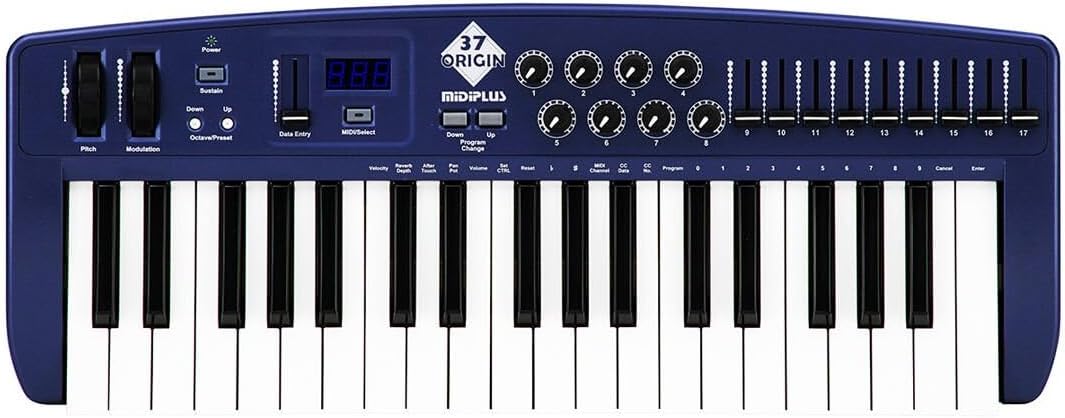
Σχήμα 4.1: Από πάνω προς τα κάτω view of the midiplus Origin 37, showing the 37 keys, pitch and modulation wheels, control knobs, sliders, and display.
4.1 Χειριστήρια μπροστινού πίνακα
- 37 Full-Size Sensitive Keys: Standard piano-style keys for playing notes.
- Τροχός κάμψης Pitch: Allows for real-time pitch modulation of notes.
- Τροχός διαμόρφωσης: Provides real-time control over various assignable parameters, typically vibrato or other effects.
- Κουμπί λειτουργίας: Ενεργοποιεί ή απενεργοποιεί τη μονάδα.
- Κουμπί Συνέχισης: Toggles sustain on/off, mimicking a sustain pedal.
- Κουμπιά Octave Πάνω/Κάτω: Shifts the keyboard's octave range up or down.
- Data Entry Slider: Used for adjusting parameter values shown on the display.
- MIDI/Select Button: Used to enter MIDI configuration mode or select options.
- Program Up/Down Buttons: Navigates through different program or preset numbers.
- 8 Real-Time Controller Knobs (1-8): Assignable rotary encoders for controlling various MIDI parameters.
- 9 Real-Time Controller Sliders (9-17): Assignable faders for controlling various MIDI parameters.
- Οθόνη LED: Shows current parameter values, program numbers, and other status information.

Figure 4.2: Detail of the left-side controls, including Pitch Bend, Modulation, Power, Sustain, Octave Up/Down, Data Entry slider, and LED display.
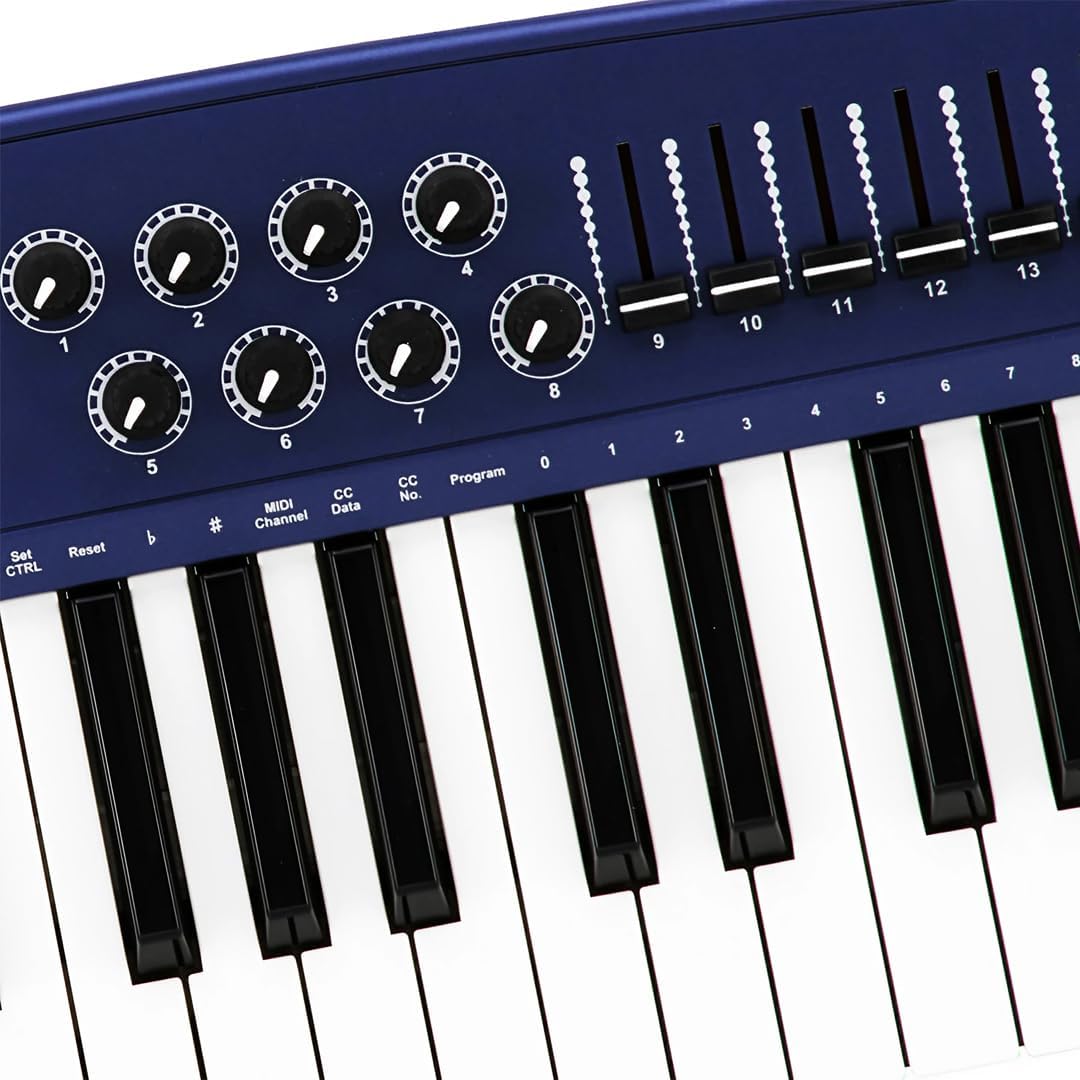
Figure 4.3: Detail of the right-side controls, showing the 8 rotary knobs and 9 faders, along with key labels for MIDI configuration.
4.2 Συνδέσεις πίσω πίνακα
- Sustain Switch Input: 1/4-inch jack for connecting an external sustain pedal (not included).
- KEYBOARD MIDI OUT (5-pin DIN): Standard MIDI output for connecting to other MIDI devices.
- Θύρα USB: For connecting to a computer (PC/Mac) for MIDI communication and power.
- Διακόπτης ρεύματος: Κύριος διακόπτης τροφοδοσίας για τη μονάδα.

Figure 4.4: Rear panel showing the Sustain Switch input, KEYBOARD MIDI OUT, USB port, and Power switch.
5. Ρύθμιση
5.1 Σύνδεση με υπολογιστή (USB)
- Βεβαιωθείτε ότι ο υπολογιστής σας είναι ενεργοποιημένος.
- Connect one end of the supplied USB cable to the USB port on the rear panel of the Origin 37.
- Συνδέστε το άλλο άκρο του καλωδίου USB σε μια διαθέσιμη θύρα USB στον υπολογιστή σας.
- The Origin 37 is USB class-compliant and does not require special drivers for most operating systems (PC/Mac). It will be powered via the USB connection.
- Turn on the Origin 37 using the Power button on the front panel.
- Your computer should automatically recognize the device. You can then select it as a MIDI input device in your Digital Audio Workstation (DAW) or music software (e.g., Ableton Live).
5.2 Connecting to External MIDI Devices (MIDI OUT)
- Ensure both the Origin 37 and the external MIDI device are powered off.
- Connect a standard 5-pin MIDI cable from the "KEYBOARD MIDI OUT" port on the Origin 37 to the MIDI IN port of your external MIDI device (e.g., synthesizer, sound module).
- Power on the Origin 37, then power on your external MIDI device.
- Configure your external MIDI device to receive MIDI data on the appropriate MIDI channel.
5.3 Connecting a Sustain Pedal
- Connect a standard 1/4-inch TS (mono) sustain pedal (not included) to the "Sustain Switch" input on the rear panel.
- The pedal will function as a sustain control for your MIDI notes.
6. Οδηγίες λειτουργίας
6.1 Βασική λειτουργία
- Playing Keys: Simply press the keys to send MIDI note-on/note-off messages to your connected software or hardware. The keys are velocity-sensitive, meaning the harder you press, the higher the velocity value sent.
- Τροχός κάμψης Pitch: Move the wheel up or down to bend the pitch of currently held notes. It automatically returns to the center position.
- Τροχός διαμόρφωσης: Move the wheel to apply modulation effects. This wheel typically stays in the position you leave it. The specific effect controlled depends on your software or hardware instrument's settings.
- Κουμπί Συνέχισης: Press to toggle sustain on or off. When active, notes will continue to sound after the key is released, similar to a piano's sustain pedal.
- Οκτάβα Πάνω/Κάτω: Use these buttons to transpose the entire keyboard up or down in octave increments. The LED display will indicate the current octave shift.
- Πρόγραμμα πάνω/κάτω: These buttons are used to send MIDI Program Change messages, allowing you to switch between different sounds or presets on your connected MIDI device or software.
6.2 Assigning Knobs and Sliders
The 8 knobs and 9 sliders are assignable MIDI controllers. They send MIDI Control Change (CC) messages. The specific CC number each knob/slider sends can be configured. Refer to your software's or hardware's manual for how to map these CC messages to parameters.
To assign a knob or slider:
- Πατήστε το MIDI/Select button to enter configuration mode.
- Χρησιμοποιήστε το Εισαγωγή δεδομένων slider or Οκτάβα Πάνω/Κάτω buttons to navigate through parameters on the LED display.
- Select the desired knob or slider to assign.
- Adjust the value (e.g., MIDI CC number) using the Εισαγωγή δεδομένων ολισθητής.
- Τύπος MIDI/Select again to exit configuration mode and save changes.
Note: Specific assignment procedures may vary. Consult the detailed MIDI implementation chart (if available) or your DAW's manual for advanced mapping.
6.3 Data Entry and Display
The LED display provides visual feedback for various settings and parameters. The Εισαγωγή δεδομένων slider is primarily used to adjust numerical values shown on this display, such as MIDI channel, CC numbers, or program numbers during configuration.
7. Συντήρηση
- Καθάρισμα: Use a soft, dry cloth to clean the surface of the unit. Do not use abrasive cleaners, waxes, or solvents.
- Αποθήκευση: When not in use for extended periods, store the controller in a cool, dry place, away from direct sunlight and extreme temperatures.
- Χειριζόμενος: Αποφύγετε την πτώση της μονάδας ή την έκθεσή της σε ισχυρές κρούσεις.
- Εξουσία: Always disconnect the USB cable when the unit is not in use or during electrical storms.
8. Αντιμετώπιση Προβλημάτων
| Πρόβλημα | Πιθανή αιτία | Διάλυμα |
|---|---|---|
| Δεν υπάρχει ρεύμα/Η μονάδα δεν ενεργοποιείται. | Το καλώδιο USB δεν είναι συνδεδεμένο ή είναι ελαττωματικό. | Ensure USB cable is securely connected to both the controller and a powered USB port. Try a different USB port or cable. |
| No sound from software/hardware. | MIDI input not selected in software; incorrect MIDI channel; software instrument not loaded. | Verify the Origin 37 is selected as a MIDI input device in your DAW. Check that the MIDI channel on the controller matches the receiving channel of your software/hardware. Ensure a sound-generating instrument is loaded and active. |
| Knobs/Sliders do not control parameters. | Not mapped in software; incorrect MIDI CC assignment. | Ensure the knobs/sliders are correctly mapped to parameters within your DAW or software instrument. Check the MIDI CC numbers being sent by the controller and ensure they match the expected input. |
| Keys are not responding or sending incorrect notes. | Connection issue; software conflict. | Reconnect the USB cable. Restart your computer and DAW. Check for any conflicting MIDI drivers or software. |
| LED display flickering or unstable. | Power fluctuation; internal fault. | Ensure a stable USB power source. Try connecting to a different USB port or a powered USB hub. If the issue persists, contact customer support. |
9. Προδιαγραφές
| Χαρακτηριστικό | Λεπτομέρεια |
|---|---|
| Κλειδιά | 37 full-size, velocity-sensitive keys |
| Ελεγκτές | Pitch Bend Wheel, Modulation Wheel, 8 Assignable Knobs, 9 Assignable Sliders, Sustain Button, Octave Up/Down, Program Up/Down, Data Entry Slider |
| Επίδειξη | Οθόνη LED |
| Συνδέσεις | USB (Type B), 5-pin MIDI OUT, 1/4" Sustain Switch Input |
| Τροφοδοτικό | Τροφοδοσία διαύλου USB |
| Αρμονία | PC, Mac (USB Class Compliant) |
| Διαστάσεις (Μ x Π x Υ) | 27.56 x 10.24 x 4.13 ίντσες (70 x 26 x 10.5 cm) |
| Βάρος | 6.39 λίβρες (2.9 κιλά) |
10. Εγγύηση και υποστήριξη
10.1 Πληροφορίες εγγύησης
Midiplus products are designed and manufactured to the highest quality standards. For specific warranty terms and conditions, please refer to the warranty card included with your product or visit the official Midiplus webτοποθεσία. Κρατήστε την απόδειξη αγοράς σας ως απόδειξη αγοράς για αξιώσεις εγγύησης.
10.2 Υποστήριξη πελατών
If you encounter any issues or have questions not covered in this manual, please contact Midiplus customer support. You can typically find contact information on the official Midiplus webστον ιστότοπο ή μέσω του λιανοπωλητή σας.
Για περαιτέρω βοήθεια, μπορείτε να επισκεφθείτε την Midiplus Store on Amazon.
Ask a question about this manual
Ask about setup, troubleshooting, compatibility, parts, safety, or missing instructions. Manuals+ will review the question and use this page’s manual context to help answer it.