1. Εισαγωγή
This manual provides essential information for the safe and efficient operation of your InFocus IN112a SVGA DLP Projector. Please read it thoroughly before using the projector and retain it for future reference. The InFocus IN112a is designed to deliver clear and bright projections for various applications, featuring SVGA resolution, HDMI connectivity, and 3D support.
2. Πληροφορίες Ασφάλειας
Τηρήστε τις ακόλουθες προφυλάξεις ασφαλείας για να αποτρέψετε ζημιά στον προβολέα και να διασφαλίσετε την ασφάλεια του χρήστη:
- Do not look directly into the projector lens όταν το λamp είναι αναμμένο. Το έντονο φως μπορεί να προκαλέσει οφθαλμική βλάβη.
- Βεβαιωθείτε για τον κατάλληλο αερισμό. Μην φράζετε τα ανοίγματα εξαερισμού.
- Only qualified service personnel should open the projector casinζ. Δεν υπάρχουν εξαρτήματα που μπορούν να επισκευαστούν από τον χρήστη στο εσωτερικό.
- Χρησιμοποιήστε μόνο το καλώδιο τροφοδοσίας που παρέχεται με τον προβολέα.
- Κρατήστε τον προβολέα μακριά από νερό ή υγρά περιβάλλοντα.
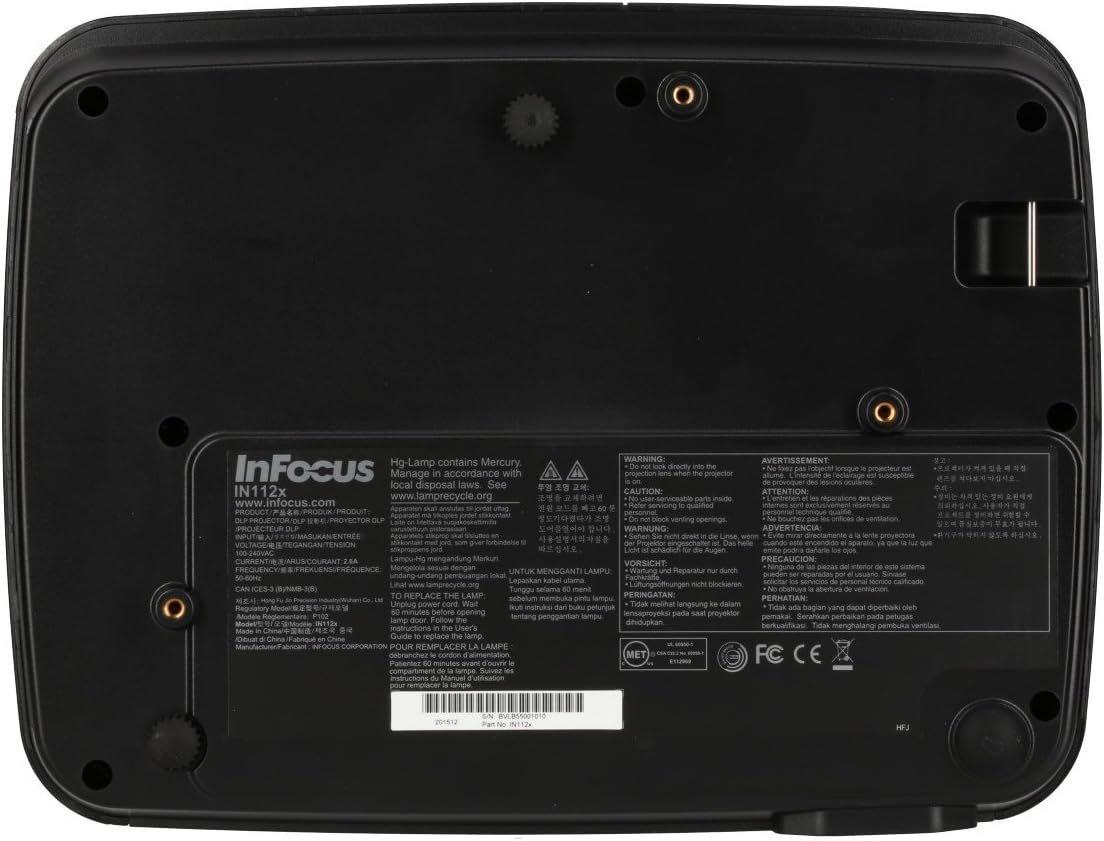
- Ο προβολέας lamp contains mercury. Dispose of lamps according to local regulations. Visit www.lamprecycle.org για περισσότερες πληροφορίες.

Εικόνα: Κάτω view of the InFocus IN112a projector, displaying various warning labels, regulatory compliance marks (like CE, FCC), and information regarding the mercury content in the lamp and recycling instructions.
3. Το προϊόν τελείωσεview
3.1. Projector Dimensions

Εικόνα: Μπροστά view of the InFocus IN112a projector, illustrating its physical dimensions. The projector measures approximately 292 mm in width, 220 mm in depth, and 108 mm in height.
3.2. Χειριστήρια επάνω πίνακα
Εικόνα: Κορυφή view of the InFocus IN112a projector, highlighting the control panel. This panel includes buttons for power, menu access, source selection, and directional navigation for menu adjustments.
The top panel features buttons for power on/off, menu access, input source selection, and navigation arrows for adjusting settings within the on-screen display (OSD) menu. The focus and zoom rings are located near the lens.
3.3. Συνδέσεις πίσω πίνακα

Εικόνα: Πίσω view of the InFocus IN112a projector, displaying its comprehensive array of connectivity ports. These include HDMI 1.4, two VGA inputs (Computer 1, Computer 2), a VGA monitor output, S-Video, Composite video, two 3.5mm stereo audio inputs, one 3.5mm stereo audio output, an RS232C control port, and a USB-B port.
The rear panel provides a variety of connection options:
- HDMI 1.4: Για ψηφιακή είσοδο βίντεο και ήχου.
- VGA (Computer 1, Computer 2): Two inputs for analog computer signals.
- VGA Monitor Out: Για σύνδεση εξωτερικής οθόνης.
- Σύνθετο βίντεο: Για είσοδο βίντεο τυπικής ευκρίνειας.
- S-βίντεο: For enhanced standard definition video input.
- Audio In (3.5mm x 2): Για στερεοφωνική είσοδο ήχου.
- Έξοδος ήχου (3.5 χιλ.): For stereo audio output to external speakers.
- RS232C: For projector control via a computer or control system.
- USB-B: Για ενημερώσεις σέρβις ή υλικολογισμικού.
4. Ρύθμιση
4.1. Τοποθέτηση
Position the projector on a stable, flat surface or mount it securely to a ceiling. Ensure there is adequate space around the projector for ventilation. The distance from the screen will determine the image size. Refer to the specifications section for throw ratio details.
4.2. Ρεύμα σύνδεσης
Connect the supplied power cord to the projector's power inlet and then to a grounded electrical outlet. The power LED will illuminate, indicating standby mode.
4.3. Σύνδεση πηγών βίντεο
Connect your video source (e.g., computer, Blu-ray player, cable box) to the appropriate input port on the projector's rear panel using a compatible cable. For best quality, use the HDMI input.
- HDMI: Connect an HDMI cable from your source to the projector's HDMI port.
- VGA: Connect a VGA cable from your computer to either the Computer 1 or Computer 2 port.
- Composite/S-Video: Connect the respective cable for older video sources.
4.4. Σύνδεση ήχου
If using VGA, Composite, or S-Video inputs, connect an audio cable from your source's audio output to one of the projector's 3.5mm Audio In ports. HDMI carries both video and audio, so a separate audio connection is not typically needed for HDMI sources.
4.5. Adjusting Focus and Zoom
After powering on the projector and displaying an image, rotate the Δαχτυλίδι εστίασης around the lens until the image is sharp and clear. Use the Δαχτυλίδι ζουμ για να προσαρμόσετε το μέγεθος της εικόνας ώστε να ταιριάζει στην οθόνη σας.
5. Λειτουργία
5.1. Ενεργοποίηση/Απενεργοποίηση
- Για ενεργοποίηση: Press the Power button on the projector's top panel or the remote control. The power indicator will turn green.
- Για απενεργοποίηση: Press the Power button twice. The projector will enter a cooling cycle, and the power indicator will turn red (standby) once complete.
5.2. Επιλογή πηγής εισόδου
Press the "Source" button on the projector or remote control repeatedly to cycle through available input sources (HDMI, VGA1, VGA2, S-Video, Video). The projector will automatically detect an active signal if "Auto Source" is enabled in the menu.
5.3. Πλοήγηση μενού
Press the "Menu" button to access the On-Screen Display (OSD) menu. Use the directional arrows to navigate through menu options and the "Enter" button to select. Press "Menu" again to exit.
5.4. 3D Content Playback
The IN112a supports 3D content from Blu-ray players, cable boxes, dish services (over HDMI), and PC-based 3D content at 120Hz. To view 3D content, you will need 144 Hz DLP Link 3D glasses (sold separately).
- Ensure your 3D source is connected via HDMI.
- Play 3D content from your source.
- Turn on your 144 Hz DLP Link 3D glasses. The projector should automatically detect the 3D signal.
6. Συντήρηση
6.1. Cleaning the Projector Lens
Σκουπίστε απαλά τον φακό με ένα μαλακό πανί που δεν αφήνει χνούδι, ειδικά σχεδιασμένο για οπτικές επιφάνειες. Μην χρησιμοποιείτε λειαντικά καθαριστικά ή υπερβολική δύναμη, καθώς αυτό μπορεί να γρατσουνίσει τον φακό.
6.2. Λamp Αντικατάσταση
Ο προβολέας lamp has a lifespan of up to 10,000 hours. When the lamp life is nearing its end, a warning message may appear, or the lamp indicator LED may illuminate. Refer to the full service manual for detailed lamp οδηγίες αντικατάστασης. Προειδοποίηση: Το λamp περιέχει υδράργυρο. Απορρίψτε το χρησιμοποιημένο lamps according to local environmental regulations.
6.3. Καθαρισμός φίλτρων αέρα
Regularly clean the air filters to ensure proper ventilation and prevent overheating. Dust and debris can accumulate, reducing cooling efficiency. Gently remove the filter cover and clean the filter with a soft brush or vacuum cleaner. Replace the filter cover securely.
7. Αντιμετώπιση Προβλημάτων
| Πρόβλημα | Πιθανή αιτία | Διάλυμα |
|---|---|---|
| Δεν εμφανίζεται εικόνα |
|
|
| Η εικόνα είναι θολή |
|
|
| Χωρίς ήχο |
|
|
| Ο προβολέας υπερθερμαίνεται και απενεργοποιείται |
|
|
8. Προδιαγραφές
| Χαρακτηριστικό | Λεπτομέρεια |
|---|---|
| Αριθμός μοντέλου | IN112X |
| Τεχνολογία εμφάνισης | DLP |
| Εγγενής ανάλυση | SVGA (800 x 600) |
| Λάμψη | Έως 3200 Lumens |
| Αναλογία αντίθεσης | 15,000:1 |
| Lamp Ζωή | Έως 10,000 ώρες |
| Συνδεσιμότητα | HDMI 1.4, VGA x 2, Composite video, S-Video, 3.5 mm stereo in x 2, 3.5mm stereo out, VGA monitor out, RS232C, USB-B |
| Υποστήριξη 3D | Yes (requires 144 Hz DLP Link 3D glasses) |
| Αναλογία ρίψεων | 1.9 - 2.09 |
| Διαστάσεις προϊόντος | 14.25 x 12 x 7.75 ίντσες (περίπου 36.2 x 30.5 x 19.7 εκ.) |
| Βάρος αντικειμένου | 5.4 λίβρες (περίπου 2.45 κιλά) |
| Συνιστώμενη χρήση | Εσωτερική/Εξωτερική |
| Ειδικό χαρακτηριστικό | Ενσωματωμένα ηχεία |
9. Εγγύηση και υποστήριξη
For warranty information and technical support, please refer to the documentation included with your purchase or visit the official InFocus webτοποθεσία. Κρατήστε την απόδειξη αγοράς για τυχόν αξιώσεις εγγύησης.